Choose Local Express if your U.S. grocery business needs branded online ordering, mobile apps, prepared-food kiosks, order management, and delivery; choose Elo Touch if your immediate project is selecting touchscreen hardware for software you already use. For 2026, the deciding question is whether you need a grocery commerce platform or the physical interface that runs an application.
- Local express vs elo touch is a platform-versus-hardware decision, not a like-for-like grocery software comparison.
- Local Express is best for regional and independent grocers seeking a unified commerce platform.
- Elo Touch is best for touchscreen hardware selection when your application is already decided.
- For grocery kiosks, assess the ordering workflow and hardware separately before choosing either vendor.
Why this matters
A prepared-food kiosk is not a complete ordering system. The touchscreen presents the interface; the application determines what shoppers order and how employees receive and handle that order.
That distinction matters when you compare Elo Touch alternatives for grocery self-service kiosks. Replacing a device does not automatically replace the ordering software, and buying commerce software does not establish which device supports your deployment.
For a 2026 grocery project, separate the business requirement from the equipment requirement. Otherwise, you risk selecting a screen before deciding how deli orders, website orders, and delivery work will reach your team.
At a glance
| Dimension | Local Express | Elo Touch |
|---|---|---|
| Best for | Regional and independent grocers seeking a commerce platform | Retailers selecting touchscreen hardware for an application |
| Touchscreen hardware | Evaluate hardware separately from the platform | Hardware-focused choice |
| Branded web and apps | White-label grocery websites and branded mobile apps | A touchscreen does not replace a website or mobile app |
| Prepared-food ordering | Made-to-order ordering through self-service kiosks | Physical touchscreen interface; ordering behavior depends on software |
| Order management | Grocery order-management platform scope | Order-management behavior depends on the application |
| Last-mile delivery | Grocery delivery is within the platform scope | Delivery workflow requires software beyond the touchscreen |
| Deployment fit | Validate your grocery workflows and integrations | Validate device, application, and peripheral fit |
| Pricing model | Evaluate platform access, implementation, and service terms | Evaluate hardware acquisition, support, and application terms |
| Standout feature | Grocery commerce across digital and in-store ordering | Touchscreen hardware specialization |
The table compares the role each option serves, not equivalent product bundles. Treat hardware selection and commerce selection as separate purchasing decisions until a written deployment plan connects them.
Elo Touch wins when the requirement is touchscreen hardware
Elo Touch is the better fit when your software is already selected and the open question is the touchscreen. That is a hardware procurement problem, not a grocery platform replacement.
For an independent supermarket, the requirement might be a customer-facing device at a prepared-food counter. Your evaluation should cover the physical installation, application requirements, connected peripherals, and service arrangements.
Ask the hardware supplier to demonstrate the proposed configuration with your actual application. A device that displays an attractive demonstration is not proof that your payment equipment, operating environment, and ordering workflow work together.
- Advantage: Hardware specialization matches a device-selection brief.
- Limitation: The screen alone does not supply grocery ecommerce, delivery operations, or order routing.
- Decision: Keep your existing application decision intact unless the workflow itself needs replacement.
Do not interpret this recommendation as confirmation that a particular device supports a particular commerce platform. Establish compatibility for the exact configuration before purchasing equipment.
Local Express wins when the project spans grocery commerce
Local Express is best for regional and independent grocers that need a unified grocery commerce platform, not just a touchscreen. Its stated scope includes white-label grocery ecommerce websites, fully branded mobile apps, made-to-order kiosks, order management, last-mile grocery delivery, and retail media tools.
That scope fits a retailer trying to extend its own customer relationship across online and in-store ordering. Hardware selection addresses the device; platform selection addresses the commerce operation.
For example, a regional grocer planning a branded app and deli ordering should evaluate those requirements together. Buying the deli screen first leaves the website, app, and operational handoffs as separate decisions.
- Advantage: The platform addresses several grocery commerce requirements under one product scope.
- Limitation: Broader scope requires a broader implementation brief, including employee workflows and existing systems.
- Decision: Choose the platform route when the project changes how your store receives and fulfills orders.
A broader platform is not automatically the right purchase. If your current grocery software works and you only need replacement hardware, keep the project focused on hardware.
Branded websites and apps favor the commerce-platform route
A branded grocery website and mobile app are customer ordering channels. A kiosk touchscreen is an in-store interface. They solve different access problems.
The commerce-platform option directly addresses white-label websites and fully branded grocery apps. Elo Touch addresses touchscreen hardware; selecting that hardware does not establish an online storefront or shopper app.
For your 2026 requirements, define what the shopper should accomplish in each channel. Online grocery ordering and a prepared-food counter do not necessarily need identical menus, fulfillment choices, or staff instructions.
Use a channel brief with 3 channels: website, mobile app, and kiosk. This is a planning recommendation, not a claim about implementation speed or performance.
- Website: Specify the shopping journey and fulfillment choices you need.
- Mobile app: Specify the branded ordering experience you need.
- Kiosk: Specify the in-store prepared-food ordering journey you need.
The platform route wins this dimension when all these channels belong in the project. The hardware route remains appropriate when online ordering is already covered elsewhere.
Prepared-food kiosks need software and hardware equally
Neither a commerce application nor a touchscreen completes the kiosk by itself. A grocery deli needs a usable ordering interface and a dependable physical installation.
The platform's made-to-order kiosk scope addresses prepared-food ordering. Elo Touch's hardware role addresses the physical interface. Judge each against the requirement it owns rather than awarding a single winner for the word kiosk.
During demonstrations, follow an order from the customer's selection to the employee's work queue. Ask what happens when an item becomes unavailable, the shopper changes a selection, or an order needs correction. These are acceptance questions, not assumed features.
For 2026, use a deli workflow that matches your store: a prepared sandwich order, an unavailable item, and a cancellation request. Do not accept a generic retail demonstration as a substitute.
Verdict: both layers matter; neither gets a standalone win. The application must handle the ordering requirement, and the hardware must support the approved application configuration.
Order management favors software; device selection does not replace it
Order management determines how employees receive, identify, and act on customer requests. Screen size and mounting decisions do not answer those questions.
The commerce platform includes order management in its stated scope. Elo Touch hardware should be evaluated as the interface for whatever application you choose, not credited with capabilities supplied by that application.
Before selecting software, document the handoff between the customer, the deli or fulfillment team, and the person responsible for resolving exceptions. Require a demonstration of the full handoff, including the employee-facing steps.
Useful acceptance questions include:
- Where does a new order appear?
- Who owns the order after acceptance?
- How does an employee identify an order needing attention?
- What information remains available after completion?
For a broader implementation brief, use the guide to centralized order management across web, app, and kiosk channels.
Verdict: choose the software-led route when order handling is the problem. Choose hardware when the workflow is established and the device needs replacement.
Delivery requirements belong in the platform evaluation
A grocer adding delivery needs to define more than the customer-facing ordering screen. The project also includes fulfillment handoffs and the delivery operation.
Last-mile grocery delivery is part of the commerce platform's stated scope. A touchscreen purchase does not establish delivery management, regardless of which application appears on the screen.
For a U.S. regional grocer, write the operating requirements before reviewing demonstrations. Include the stores participating, the orders eligible for delivery, the staff responsibilities, and how exceptions reach a responsible employee.
Ask the platform provider to show the specific delivery workflow your store needs. Do not treat a general capability description as confirmation of every scheduling, dispatch, or driver-management requirement.
- Platform advantage: Delivery belongs within the stated product scope.
- Platform limitation: Your particular operating requirements still need validation.
- Hardware advantage: Device selection stays focused when delivery software is already established.
- Hardware limitation: The device does not resolve delivery-process gaps.
Verdict: a delivery expansion is a commerce-software decision first. Hardware becomes a supporting decision where a physical interface is required.
Deployment fit is a tie until the actual configuration passes
Neither vendor wins implementation fit from a category description. The right configuration must work with your store's application, equipment, and employee process.
For a 2026 evaluation, start with 1 pilot store and a written acceptance checklist. This is a recommended scope for validation, not a promised rollout schedule.
Organize that checklist around these responsibilities:
- Application fit: Demonstrate the required shopping and ordering behavior.
- Device fit: Confirm the proposed hardware supports the application configuration.
- Payment fit: Validate the intended payment setup with the responsible providers.
- Staff handoff: Show how employees receive and handle orders.
- Support ownership: Name the party responsible for each failure type.
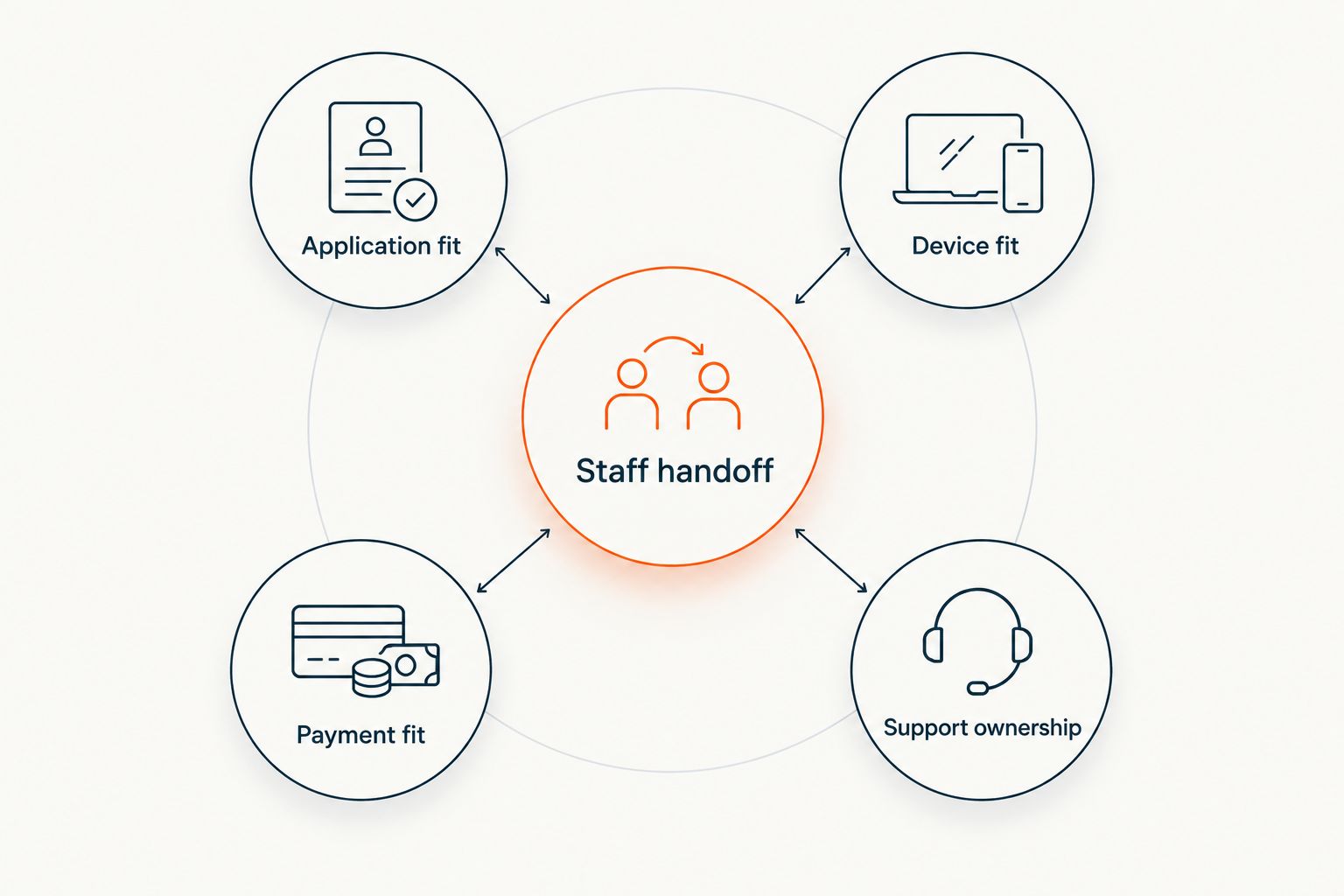
Run 30 test orders through the pilot as a recommended acceptance exercise. Include normal orders and the exceptions your store needs to handle; this is not a performance benchmark or a vendor result.
Verdict: deployment fit is a tie until tested. A documented working configuration matters more than a broad compatibility statement.
Pricing models: compare responsibilities, not isolated line items
Evaluate the platform agreement and the hardware purchase as different commercial structures. Neither comparison should begin with an unsupported assumption about subscriptions, ownership terms, or bundled services.
For the commerce platform, request a written breakdown of platform access, implementation responsibilities, optional services, and ongoing support terms. Confirm which parts of your grocery project the agreement covers.
For Elo Touch, request terms for the proposed hardware configuration and its support arrangements. Separately identify the application provider, deployment work, and any connected equipment required by your design.
The tradeoff is contract scope. A hardware agreement can be clearly bounded around equipment while leaving software and operations to other parties. A platform agreement can address broader workflows while requiring more detailed implementation responsibilities.
Compare proposals using the same questions:
- What is included in the agreement?
- What requires another supplier?
- Who completes implementation?
- Who handles ongoing support?
- What changes require a new commercial agreement?
Verdict: neither commercial model wins universally. Choose the agreement structure that matches your project and makes responsibility explicit.
Final verdict: choose the owner of your actual problem
Choose Local Express if you own a broader grocery commerce project
Best for: the regional or independent grocer's owner or operations lead replacing fragmented ordering workflows. Choose Local Express when the requirement includes branded grocery ecommerce, mobile ordering, prepared-food kiosks, order management, or last-mile delivery within a grocery platform.
The strongest reason to choose this route is scope. The reason not to choose it is equally clear: a hardware-only replacement does not justify expanding the project into a platform evaluation.
Choose Elo Touch if your application is settled
Best for: the grocery retailer's IT or store-systems lead selecting touchscreen equipment. Choose Elo Touch when the ordering application already meets your needs and the remaining work is device selection, installation fit, and hardware support.
The strongest reason to choose this route is a defined hardware requirement. The reason not to choose it is an unresolved software workflow: replacing the screen will not decide how orders, apps, or delivery operate.
One-glance scorecard
| Dimension | Winner |
|---|---|
| Touchscreen hardware selection | Elo Touch |
| Branded grocery websites and apps | Commerce-platform route |
| Prepared-food kiosk completeness | Tie: software and hardware both required |
| Grocery order management | Commerce-platform route |
| Last-mile grocery delivery scope | Commerce-platform route |
| Validated deployment fit | Tie until configuration testing |
| Commercial model | Tie: match contract scope to the project |
| Hardware-only replacement | Elo Touch |
FAQ
Is Local Express better than Elo Touch for a grocery store?
Local Express is the better fit for a grocery commerce platform; Elo Touch is the better fit for touchscreen hardware selection. Choose according to whether your project needs ordering software or a physical interface for software already selected.
Are Elo Touch and grocery ecommerce software the same thing?
No, touchscreen hardware and grocery ecommerce software serve different roles. Hardware presents an interface, while the application determines the shopping journey and order workflow.
Which option should I choose for a grocery deli kiosk?
Evaluate the ordering software and touchscreen hardware separately for a grocery deli kiosk. Require the proposed configuration to demonstrate customer ordering, employee handoffs, and the exceptions your deli needs to handle.
Can I assume Elo Touch hardware works with my grocery platform?
No, compatibility must be confirmed for the exact device and application configuration. Obtain written confirmation covering the intended operating environment and connected peripherals before purchasing.
Should I replace my platform if I only need a new touchscreen?
No, a hardware-only requirement does not justify replacing an ordering platform that meets your needs. Evaluate the device against your existing application's requirements first.
How should I compare the commercial terms?
Compare the responsibilities covered by each agreement rather than treating a platform and a touchscreen as equivalent purchases. Review implementation, application access, equipment, support ownership, and any additional suppliers separately.
What should an independent grocer test before rollout in 2026?
Test the complete customer-to-employee ordering workflow before rollout in 2026. Use a pilot store and written acceptance checks covering application behavior, hardware fit, payments, operational exceptions, and support ownership.
One last thing
The most useful demonstration starts with a failed order, not a successful one. Ask each proposed supplier to show who responds when the application stops accepting orders, a device loses connectivity, or a payment cannot complete.
For your 2026 decision, write the responsible party beside each failure scenario. That exercise exposes the boundary between software, hardware, and store operations before it becomes an unresolved support call.