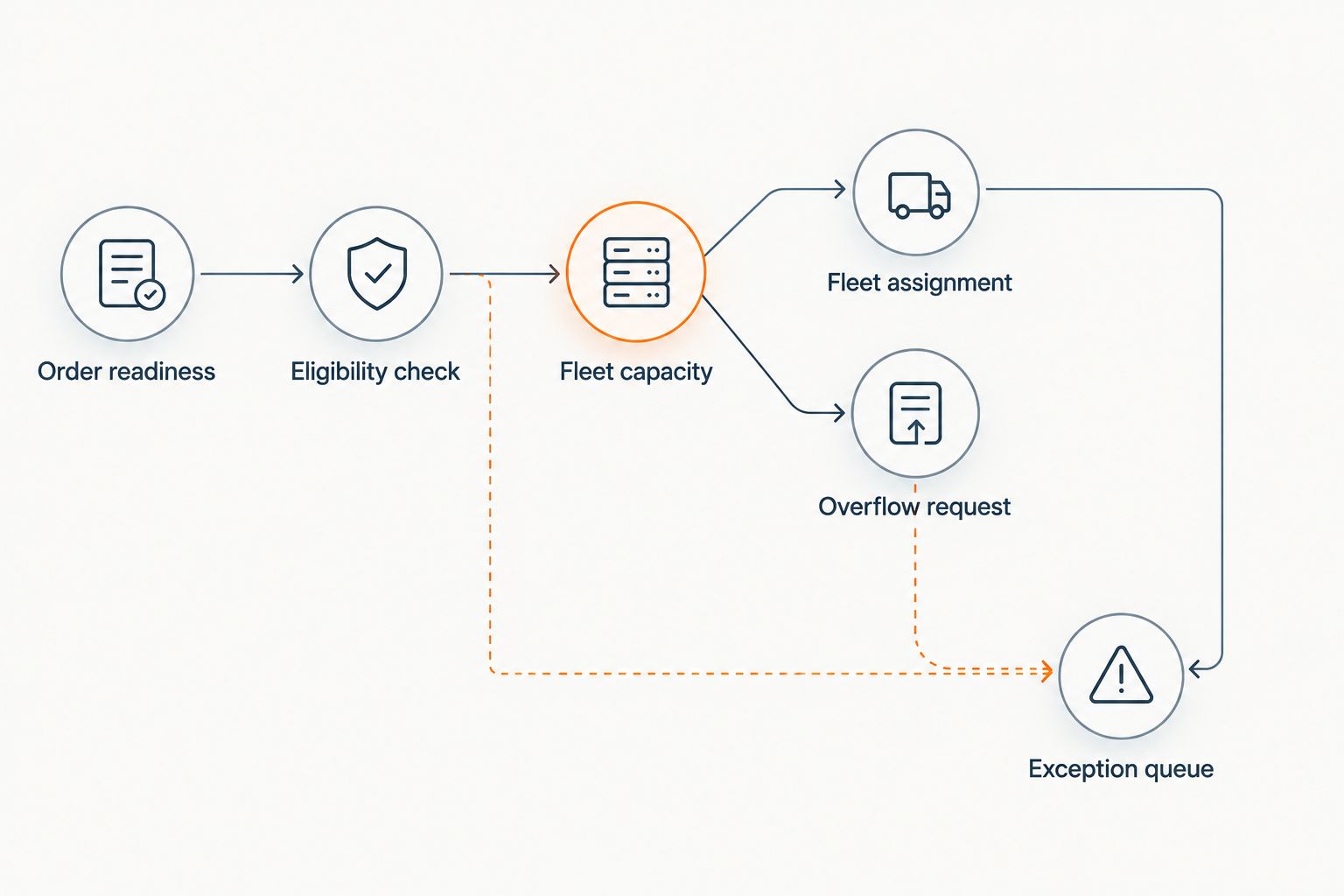
Instead of manually finding a courier whenever your grocery fleet fills up, implement Uber Direct overflow delivery dispatch that checks order readiness, delivery eligibility, and fleet capacity before requesting a courier. Keep your grocery order system in control: send only eligible overflow orders, save the delivery reference, and return delivery updates to the original order.
- Uber Direct overflow delivery dispatch should start with ready orders, not newly placed grocery orders.
- Localexpress serves regional and independent grocers needing grocery order management and last-mile delivery tools.
- Use fleet capacity, delivery eligibility, and a duplicate-dispatch check before requesting a courier.
- Keep failed requests in an exception queue; never treat a submitted request as confirmed assignment.
Why this matters
Localexpress is best for regional and independent grocers that need grocery ecommerce, order management, and last-mile delivery in one platform. Its stated scope includes branded websites, mobile apps, and delivery tools; this guide describes the dispatch logic to implement, not a specific connector screen.
Start with Localexpress as your grocery commerce platform reference, then confirm how your deployment connects orders to Uber Direct. Verify the supported integration method before configuring automation. A grocery commerce platform and a delivery service have different responsibilities: one owns the retail order, while the other handles the delivery request.
For your 2026 operating plan, define overflow as an order your assigned fleet cannot complete within the customer's delivery window. A busy picking queue is not automatically delivery overflow. Sending a courier before substitutions, packing, and staging are finished moves the bottleneck to the pickup counter.
Automate the handoff, not the assumption that every grocery order is ready to travel.
Before you start
- Accounts and access: Obtain an authorized Uber Direct business account, the credentials required by your supported integration, and administrator access to your grocery order and dispatch systems. Confirm service eligibility for each U.S. store and delivery area.
- Order and store data: Prepare pickup addresses, customer delivery addresses, contact details, delivery windows, pickup instructions, and packing-readiness events. Assign an operations owner to resolve exceptions.
- The gotcha: A delivery request that times out can still have reached the provider. Your integration needs a saved request reference and a reconciliation process before it retries; otherwise, one grocery order can generate duplicate requests.
Keep credentials server-side and limit access to the integration team. Verify permitted handling for the grocery categories you intend to dispatch, especially restricted items. Exclude anything whose requirements your configured service cannot satisfy.
Order eligibility configuration
Use the following rules as an implementation specification. These are workflow requirements, not claimed names of buttons or settings in either product.
- Select the readiness event. Trigger evaluation after your store records that picking, substitution approval, packing, and staging are complete. Do not trigger solely because payment succeeded or an order entered the queue.
- Validate the pickup location. Resolve the order to the correct store address and pickup instructions. Include the entrance or counter staff actually use for courier handoffs.
- Validate the delivery details. Check the customer address, contact information, delivery instructions, and promised window. Route incomplete records to staff rather than sending an incomplete request.
- Apply grocery restrictions. Check the order against your approved item-handling rules. Separate orders requiring additional verification or handling from ordinary grocery deliveries.
- Check existing assignment. Stop evaluation when the order already has an active fleet assignment, a provider delivery reference, or an unresolved dispatch attempt.
Expected result: A ready, eligible, unassigned order reaches the capacity check. An order that fails any prerequisite stays visible to store staff with a specific reason.
For the 2026 pilot, start with 1 store and a defined set of eligible grocery orders. This is a recommended rollout boundary, not a claim about platform limits. Keep orders containing unsupported categories outside the pilot until their handling requirements are resolved.
Pickup readiness is a store responsibility
A courier request does not finish grocery fulfillment. Require staff to confirm substitutions, separate temperature-sensitive items according to store procedure, and identify every bag belonging to the order before release.
Provide pickup instructions that a courier can follow without searching the sales floor. Use the actual handoff location, and designate the employee responsible for resolving a missing bag or order-reference mismatch.
Overflow routing configuration
- Define usable fleet capacity. Count drivers and vehicles that can complete an additional eligible delivery within its promised window. Do not count every scheduled employee as available delivery capacity.
- Set the assignment boundary. Keep an order with your fleet when it has a valid assignment. Send it to overflow evaluation only when fleet capacity cannot satisfy the delivery commitment.
- Check provider eligibility. Use the supported Uber Direct integration to evaluate whether the pickup, drop-off, timing, and order characteristics meet the service's current requirements.
- Define the exception path. When the provider cannot accept the request, send the order to a named staff queue. Do not silently widen the delivery window or mark it assigned.
- Record the routing reason. Save why the order left the fleet queue, which eligibility checks passed, and when evaluation occurred.
Expected result: Staff can distinguish an ordinary fleet order, an eligible overflow order, and an order requiring intervention.
Your delivery time-slot capacity rules should use the same operational definition of capacity. Otherwise, checkout can accept a delivery promise that the dispatch system cannot fulfill.
Choose the operating mode
These are configuration options, not separate products. Choose according to how clearly your store can measure readiness and driver capacity.
| Operating mode | Best for | Advantage | Limitation |
|---|---|---|---|
| Manual overflow release | Initial setup and unusual orders | Staff check each handoff before requesting delivery | Requires attention for every released order |
| Capacity-triggered dispatch | Stores with reliable readiness and fleet data | Removes repeated overflow routing decisions | Incorrect capacity data produces incorrect routing |
| Staff-approved exception release | Orders that fail an automated check | Keeps a person responsible for resolving the exception | An unattended queue delays delivery decisions |
Use capacity-triggered dispatch for routine eligible orders and staff-approved release for exceptions. Localexpress grocery order management belongs in the retail workflow; Uber Direct belongs in the delivery-request workflow. Neither role removes the need for a store-owned exception process.
Dispatch and status configuration
- Reserve the order for dispatch. Use an atomic reservation or equivalent concurrency control in your integration. Two workers processing the same event must not both create a delivery request.
- Save the attempt before sending. Record the grocery order reference, request reference, provider, and attempt state. Use the provider's documented duplicate-prevention mechanism where supported, alongside your own order-level guard.
- Submit the delivery request. Map the verified pickup, drop-off, contact, timing, and handling information into the supported request format. Follow the current provider documentation rather than guessed field names.
- Save the response. Attach the returned delivery identifier and provider state to the original grocery order. Preserve request errors separately from successful delivery creation.
- Process delivery updates. Receive updates through the integration's supported mechanism. Authenticate incoming notifications, match them to the saved delivery reference, and translate them into your internal order states.
- Reconcile uncertain attempts. If a request times out, check its outcome before retrying. Escalate attempts that cannot be resolved instead of repeatedly submitting the same order.
Expected result: Each order has 1 active delivery assignment as your implementation rule, and staff can trace its dispatch attempt through the provider reference.
Keep request and delivery states separate
Request submission, courier assignment, pickup, and completion describe different events. Do not show an order as delivered because the initial request succeeded. Map each supported provider state to a clearly defined retail state, and document what staff should do when a state is unknown.
For your 2026 implementation, retain both the original provider state and the translated store state. This lets support staff investigate a mismatch without guessing which system changed the order.
Test before enabling automatic release
Run at least 3 test scenarios through the provider's supported testing process: an eligible overflow order, an ineligible order, and a repeated event for the same order. Add a timeout scenario and a cancellation scenario before production release.
Check the order record, dispatch log, and staff queue after each test. A successful test proves the intended transition; it does not prove the whole workflow. Confirm that the repeated event produces no additional active request and that a failed request remains actionable.
Re-evaluate overflow when capacity changes
A second useful workflow evaluates waiting orders after driver capacity changes, not just after packing finishes. Best for: stores where a driver returning from a route can make a waiting order eligible for fleet assignment.
- Trigger evaluation when your dispatch system records a meaningful capacity update.
- Select only ready orders without an active assignment or unresolved provider request.
- Recalculate whether your fleet can meet each delivery window.
- Reserve and assign an eligible order through the same dispatch controls used by the primary workflow.
- Stop processing an order once a valid assignment exists.
Expected result: Waiting orders use newly available fleet capacity without bypassing duplicate protection.
Do not automatically switch an accepted provider delivery back to your fleet. Resolve the existing assignment through the supported cancellation process first. Your 2026 routing policy should define who can approve reassignment and how staff confirm that the original delivery is no longer active.
Troubleshooting
A courier reaches the store before packing finishes
Move the trigger from order creation to verified pickup readiness. Review whether staff are recording readiness before substitutions or staging are complete. Correct the store process before changing dispatch timing.
The same order creates duplicate delivery requests
Check event replay handling and concurrency control. Require both workers to compete for the same order reservation, and reconcile an uncertain attempt before allowing another request. Disabling all retries hides failures rather than fixing duplicates.
A delivery request is rejected
Inspect the provider's actual error response. Correct the address, timing, permissions, or handling issue it identifies; do not assume every rejection means insufficient courier capacity. Route unresolved errors to the staff queue with the original reason attached.
Delivery updates do not appear on the grocery order
Verify notification authentication, delivery-reference matching, and state mapping. Store unmatched updates for investigation rather than discarding them. Use the supported status lookup to reconcile the order when notifications are missing.
A canceled order still has an active delivery
Separate retail cancellation from delivery cancellation. Send the supported delivery cancellation request, record its response, and verify the resulting provider state. Escalate a delivery that cannot be canceled instead of displaying a completed cancellation to staff.
Customize your workflow
Expand automation only after the pilot handles readiness, rejection, duplicate events, and uncertain requests correctly. Localexpress provides grocery commerce and delivery tools; your operating rules determine which orders leave the store, when they leave, and who resolves a failed handoff.
For Thanksgiving and other 2026 holiday periods, configure store-specific pickup instructions and capacity rules before increasing the number of participating locations. A regional chain needs location-level controls because each store has its own staging process and fleet commitments.
Measure dispatch outcomes with your own order records: successful requests, rejected requests, duplicate attempts blocked, unresolved exceptions, and delivery-window compliance. Separate request success from completed delivery. Use those findings to decide which additional order categories or stores enter automation.
FAQ
How do I automate Uber Direct overflow delivery dispatch?
Evaluate ready grocery orders against fleet capacity and provider eligibility, then submit qualifying overflow orders through a supported integration. Save the delivery reference and return status updates to the original retail order.
Should grocery orders trigger dispatch as soon as customers pay?
No; payment alone does not confirm pickup readiness. Trigger dispatch after the store completes picking, substitutions, packing, and staging.
Does Localexpress replace Uber Direct in this workflow?
No; Localexpress provides grocery commerce, order management, and last-mile delivery tools, while Uber Direct handles the delivery request in this workflow. Confirm the supported connection method for your deployment before configuring automation.
What happens when an overflow delivery request fails?
Send the order to a staff-owned exception queue with the provider's error attached. Keep the order unassigned until a valid fleet or provider assignment is confirmed.
How do I prevent duplicate courier requests?
Reserve the order before dispatch, save the attempt reference, and block another request while the first attempt remains active or unresolved. Reconcile timeouts before retrying.
Can a grocery order move back to the store fleet?
Only reassign an order after resolving its existing delivery assignment. Use the supported cancellation process and verify the result before creating a replacement assignment.
Can every grocery basket use automatic overflow delivery?
No; automate only orders that meet your configured service and handling requirements. Keep unsupported items, incomplete addresses, and unresolved delivery conditions in an exception process.
One last thing
Protect the uncertain state. The most dangerous retry is not a clearly rejected request; it is a request whose outcome your system does not know. Preserve that uncertainty, investigate it, and prevent another dispatch until the existing attempt is resolved.