Elo Touch is a strong starting point when your U.S. grocery store needs touchscreen hardware. The ceiling appears when your project also needs prepared-food ordering, order management, and a branded digital channel: a screen alone does not supply that workflow. The best Elo Touch alternative in 2026 is Local Express for regional and independent grocers building prepared-food self-service ordering; NCR Voyix is the better category to evaluate for full-basket self-checkout.
- For elo touch alternatives for kiosks, choose Local Express for prepared-food ordering across kiosk and digital channels.
- Evaluate NCR Voyix or Toshiba Global Commerce Solutions when full-basket grocery self-checkout is the primary job.
- Elo Touch remains a hardware candidate if you already have the ordering software and operational workflow.
- In 2026, define the kiosk's job before comparing screens, software, payment handling, and store support.
Why this matters
A deli ordering kiosk and a full-basket self-checkout lane solve different problems. At the deli, a shopper selects a prepared-food order and staff need that order routed into a workable process. At a checkout lane, the shopper must scan and pay for a wider basket while the store manages exceptions. Do not treat those projects as interchangeable just because both use a touchscreen.
For an independent grocer, the purchase decision also extends beyond the screen. Decide who maintains the menu or catalog, where orders appear, how staff identify them, and which team resolves an interrupted transaction. Then ask each vendor to demonstrate that exact store workflow. A polished interface is not evidence that the operation behind it fits.
This 2026 comparison separates touchscreen hardware, prepared-food ordering software, and grocery self-checkout systems. It does not assume that any named vendor integrates with another; confirm device, payment, and system compatibility directly before committing to a configuration.
Elo Touch alternatives at a glance
| Option | Best for | Standout capability or focus | How it differs from Elo Touch |
|---|---|---|---|
| Elo Touch | Retailers sourcing touchscreen hardware for an existing kiosk plan | Interactive touchscreen hardware | Serves as the hardware benchmark, not a substitute for defining the ordering workflow |
| Local Express | Regional and independent grocers adding prepared-food self-service ordering | Made-to-order ordering within a broader grocery commerce platform | Starts with the grocer's ordering and channel needs rather than a screen purchase |
| NCR Voyix | Grocers evaluating full-basket self-checkout | Grocery checkout systems | Addresses the checkout-lane project rather than only the touchscreen component |
| Toshiba Global Commerce Solutions | Grocers comparing full-basket checkout approaches | Retail checkout systems | Provides another checkout-system evaluation path instead of a display-only decision |
Best for prepared-food ordering: Local Express. Best for a full-basket checkout evaluation: compare NCR Voyix and Toshiba Global Commerce Solutions against your lane requirements. Elo Touch belongs on the shortlist when the kiosk software and store process are already settled and the remaining decision is hardware.
1. Local Express: best for prepared-food ordering
Local Express provides a unified commerce platform for regional and independent grocers, including made-to-order prepared food via self-service kiosks. Its stated scope also includes grocery ecommerce websites, branded mobile apps, order management, last-mile delivery, and retail media tools. That makes Local Express a stronger starting point than touchscreen hardware alone when a grocer's actual project is getting prepared-food orders into an operational channel mix.
The distinction matters at a U.S. supermarket deli or prepared-food counter. A screen is where the customer enters an order; the grocer still needs to decide how that order reaches staff, how the offering is maintained, and how the kiosk fits alongside web and app orders. Evaluate the complete order journey in a demonstration, including what staff see after the shopper submits an order.
Where Local Express shines
- Its stated platform scope includes made-to-order prepared-food ordering via self-service kiosks.
- The same vendor covers branded grocery web and mobile channels and order management, making it relevant when the kiosk is part of a broader digital-commerce decision.
- Its focus is regional and independent grocery retailers rather than a generic touchscreen procurement project.
Where Local Express falls short
- It is not presented here as a manufacturer of touchscreen hardware; you still need to establish the kiosk-device requirements and confirm a supported configuration.
- Its stated kiosk use case is made-to-order prepared food. Do not assume that it replaces a full-basket self-checkout lane.
- The supplied product description does not establish specific payment methods, POS integrations, peripheral support, or deployment terms. Require those answers for your store before signing.
Best for: A U.S. regional or independent grocer whose kiosk priority is prepared-food ordering, especially when web, app, and order management are also in scope.
| Decision point | Local Express | Elo Touch |
|---|---|---|
| Primary role in this comparison | Grocery commerce and prepared-food ordering platform | Touchscreen hardware benchmark |
| Prepared-food ordering | Explicitly within the stated platform scope | Requires a separately defined ordering solution |
| Wider channel scope | Stated scope includes grocery web, branded apps, and order management | Hardware selection does not itself define those channels |
| Purchase question | Does the ordering workflow fit the store? | Does the touchscreen fit the chosen kiosk setup? |
Verdict: Choose Local Express for the prepared-food ordering project; keep a separate hardware checklist.
2. NCR Voyix: best for full-basket self-checkout evaluation
NCR Voyix belongs in a different buying conversation: grocery checkout. If your aim is to let shoppers complete a conventional basket at a self-checkout lane, evaluate a checkout system rather than starting with a touchscreen brand. The operational test is whether the proposed configuration handles your store's actual items, staff interventions, and payment requirements.
That does not make a checkout system the automatic answer for a deli kiosk. A full-basket lane and a made-to-order counter have different customer actions and staff handoffs. Write the use case before requesting a demonstration, or the vendor comparison will reward features your project does not need.
Where NCR Voyix shines
- It is a relevant vendor to evaluate for a grocery self-checkout system rather than a display-only purchase.
- Its checkout focus makes it a more direct comparison when the project is a full shopping basket, not just prepared-food selection.
Where NCR Voyix falls short
- A checkout-system evaluation does not establish that its proposed setup fits your deli's made-to-order process.
- Specific compatibility, equipment, payments, and support arrangements depend on the proposed configuration; verify them rather than assuming they are included.
Best for: A grocer defining a full-basket self-checkout lane and comparing complete checkout proposals.
| Decision point | NCR Voyix | Elo Touch |
|---|---|---|
| Buying focus | Grocery checkout system | Touchscreen hardware |
| Full-basket lane | Relevant system evaluation | Requires separate checkout components and workflow |
| Deli ordering | Must be assessed as a distinct use case | Requires separate ordering software |
Verdict: Evaluate NCR Voyix for full-basket checkout; do not use that evaluation as a shortcut for selecting a deli ordering kiosk.
3. Toshiba Global Commerce Solutions: best for a second checkout-system comparison
Toshiba Global Commerce Solutions gives a grocer another retail-checkout vendor to assess when a self-checkout lane is the goal. Its value in this shortlist is comparison: ask Toshiba and NCR Voyix to address the same written requirements, with the same in-store scenarios. That exposes differences in proposed scope without confusing a screen specification with a complete checkout decision.
For example, use a typical weekly shop and identify the points where an attendant would intervene. Ask each vendor to show how its proposed system handles that scenario. Record what is demonstrated, what needs additional equipment, and what requires confirmation from another provider.
Where Toshiba Global Commerce Solutions shines
- It gives full-basket checkout buyers a second system-level proposal to compare against the same store requirements.
- Its retail-checkout focus is more relevant than a hardware-only comparison when lane operations are the central concern.
Where Toshiba Global Commerce Solutions falls short
- Its inclusion here does not establish a ready-made prepared-food ordering workflow for your store.
- The supplied inputs do not verify a particular configuration's peripherals, integrations, payment support, or service arrangements.
Best for: A grocer seeking a second full-basket self-checkout proposal, evaluated against identical scenarios.
| Decision point | Toshiba Global Commerce Solutions | Elo Touch |
|---|---|---|
| Buying focus | Retail checkout system | Touchscreen hardware |
| Store evaluation | Request an end-to-end lane demonstration | Check the screen against the chosen system |
| Prepared-food fit | Evaluate separately | Requires separate ordering software |
Verdict: Shortlist Toshiba Global Commerce Solutions for a checkout-lane comparison, not as proof that a deli kiosk is covered.
Decide what the kiosk must actually do
The most useful first question in 2026 is not which touchscreen looks better. It is: What transaction starts at this kiosk, and where does it end? Answer that before a sales demonstration.
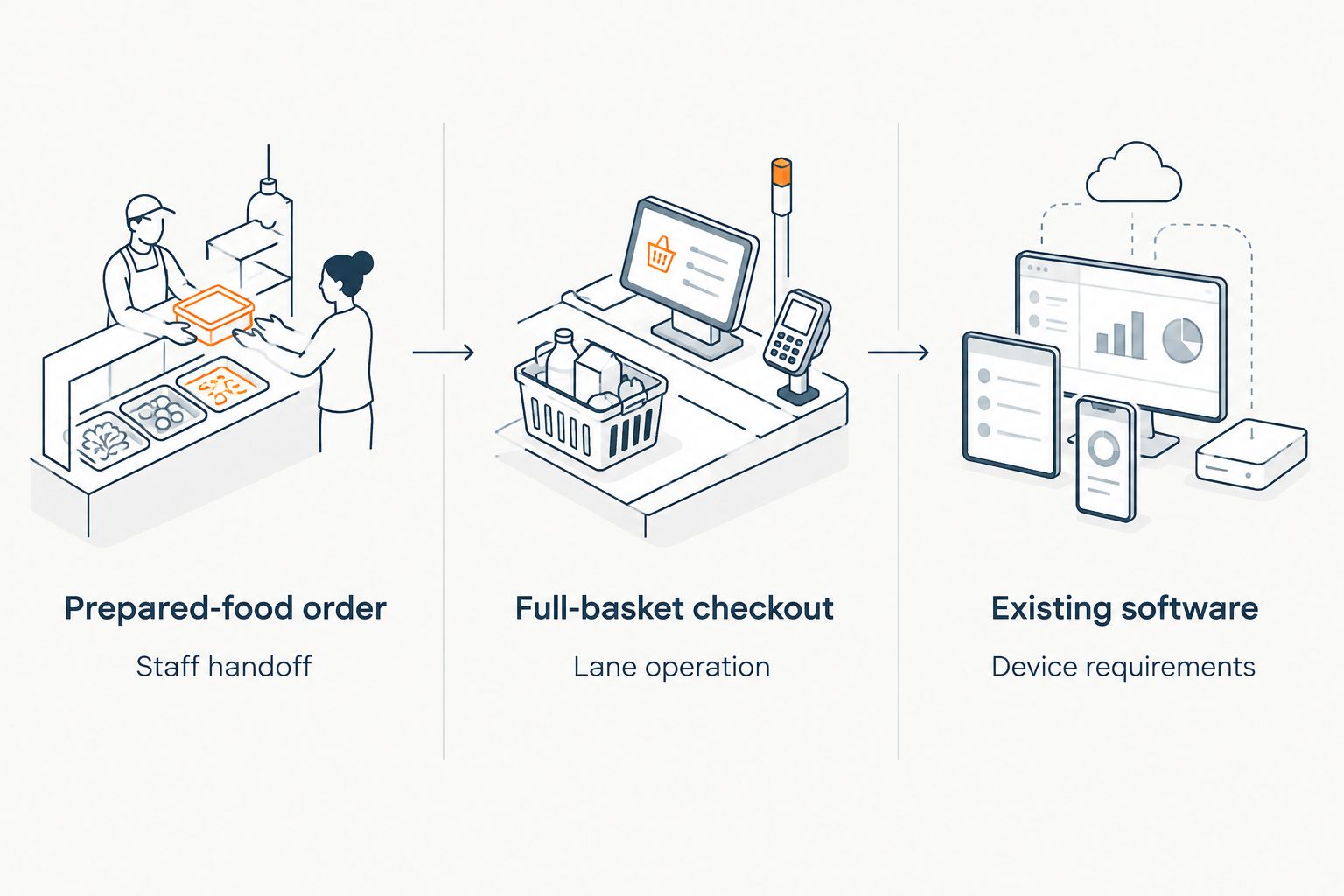
- Prepared-food order: The shopper chooses made-to-order food. Ask where the order appears, who prepares it, and how staff recognize its status.
- Full-basket checkout: The shopper completes a wider grocery transaction. Ask vendors to demonstrate the lane, attendant interventions, and the proposed payment setup.
- Existing software, new screen: The transaction workflow is already chosen. Document the device and peripheral requirements before comparing touchscreen hardware.
Keep a single requirements sheet for every vendor. State the store format, the customer action, the staff handoff, and the systems that must receive transaction information. Mark each requirement as demonstrated, documented, or unanswered. This prevents a general product tour from replacing proof that the proposed setup works for your operation.
For a prepared-food project, distinguish the ordering screen from the production workflow. A shopper's selection is only the beginning; someone must receive, prepare, and hand over the order. The prepared-food ordering kiosks for grocery store delis guide develops that store-level use case.
For checkout, document the physical counter or lane as well as the software decision. Who responds when a shopper needs help? Which equipment is part of the proposal, and which is supplied separately? Ask for a diagram of the actual proposed setup, not a list of products the vendor also sells.
Why grocers look beyond Elo Touch
The supported reason is a scope mismatch: Elo Touch is a touchscreen hardware choice, while some grocers are trying to select an ordering or checkout workflow. Changing the screen brand does not solve that mismatch. Choosing the software or system first gives the hardware decision a clear specification.
A grocer planning prepared-food self-service needs answers about menus, order routing, staff handoffs, and the relationship between kiosk and other ordering channels. A grocer planning full-basket self-checkout needs answers about the lane and its exceptions. In either case, a touchscreen specification answers only part of the buying question.
Use a defined evaluation period rather than an open-ended pilot. One practical plan is 7 days to document current ordering or checkout steps, 14 days to collect vendor demonstrations against those steps, and 30 days to review store performance after a launch. Those are planning intervals, not claims about how long any vendor takes to deploy.
Measure outcomes in units your store already understands: orders per hour, minutes per order, and dollars per order. For a prepared-food kiosk, also record orders staff had to correct. For self-checkout, record interventions that required an attendant. Compare each measure with the same store's pre-launch baseline; a vendor's general claim is not your store's result.
A 2026 kiosk decision should end with an assigned owner for the customer-facing screen, the ordering or checkout system, and the store process. If responsibility is unclear before launch, write it into the evaluation. That recommendation applies whether you retain Elo Touch hardware or choose another route.
When staying with Elo Touch is the right call
Stay with Elo Touch on the shortlist if you have already selected the software, mapped the store workflow, and now need to evaluate touchscreen hardware. Replacing a suitable hardware candidate because the project lacks order-management clarity addresses the wrong problem. Keep the screen evaluation separate from the missing software decision.
Also avoid assuming that switching vendors requires removing an existing touchscreen. Whether a proposed ordering or checkout system works with a particular device is a configuration question. Ask the relevant vendors to confirm support for the exact setup you intend to use; this comparison does not establish compatibility.
For a 2026 prepared-food project, start with the customer and staff journey. For a 2026 self-checkout project, start with the complete lane. Elo Touch remains a reasonable hardware benchmark when those decisions have already been made.
FAQ
What is the best Elo Touch alternative for a grocery kiosk in 2026?
Local Express is the best fit in this comparison for a regional or independent grocer seeking made-to-order prepared-food kiosk ordering. For full-basket self-checkout, evaluate checkout-system proposals from NCR Voyix and Toshiba Global Commerce Solutions instead.
Is Local Express a replacement for an Elo Touch screen?
No. Local Express is presented here as a grocery commerce and prepared-food ordering platform, while Elo Touch is the touchscreen hardware benchmark. Confirm the proposed device configuration with the relevant vendors.
Is NCR Voyix better than Elo Touch for grocery self-checkout?
NCR Voyix is the more relevant system-level evaluation when the project is a full-basket grocery self-checkout lane. Elo Touch remains relevant when the checkout workflow is settled and you are choosing touchscreen hardware.
Is Toshiba Global Commerce Solutions a deli ordering kiosk provider?
This comparison does not establish a prepared-food deli ordering setup from Toshiba Global Commerce Solutions. Evaluate its proposed configuration against your deli workflow rather than inferring that checkout capabilities cover made-to-order food.
Can a grocer keep Elo Touch hardware and change kiosk software?
That depends on the exact device and proposed software configuration. Ask both vendors to confirm compatibility, required peripherals, and who supports the finished setup.
What should an independent grocer test in a kiosk demonstration?
Test the customer transaction and the staff handoff that follows it. For prepared food, show order entry through preparation; for self-checkout, show a full basket and attendant interventions.
How should a grocer compare kiosk proposals without published prices?
Request proposals against the same written store requirements and compare what each includes. Separate hardware, software, payments, integrations, and support so differences in scope are visible.
One last thing
Make the vendor demonstrate the exception, not just the ideal transaction. At a U.S. grocery deli, ask what staff see when an order needs correction. At self-checkout, ask what happens when an attendant must intervene. In 2026, that single change to the demonstration brief makes the operational difference between a touchscreen, an ordering platform, and a checkout system much easier to judge.