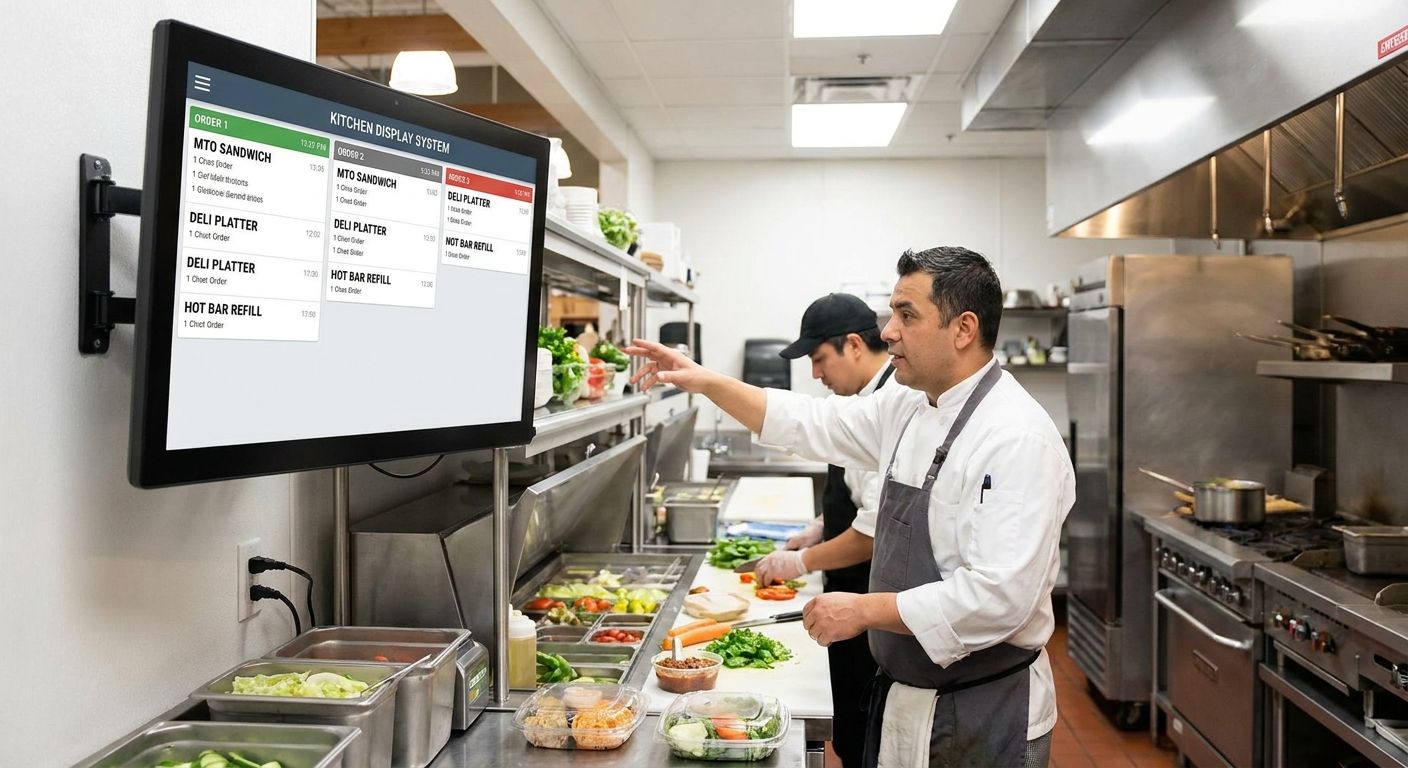
Grocery delis are running full-blown restaurant operations now — hot bars, made-to-order sandwiches, sushi counters, pizza by the slice — and most of them are still routing tickets on paper or yelling orders across a prep line. A kitchen display system for grocery deli and MTO kitchens replaces that with a screen that sequences tickets from every channel: counter, kiosk, app, and web.
- A kitchen display system for grocery deli counters cuts missed and duplicate tickets when it's tied to kiosk and app orders, not just the register.
- Standalone ticket-rail printers are the cheapest option in 2026 but break down the moment a deli runs online MTO orders alongside walk-ins.
- Order management built for MTO kitchens, like Local Express's, syncs kiosk, app, and counter orders into one prep queue — Buy for delis running a full hot bar or sandwich program.
- Centralized order management across web, app, and kiosk is the right call for regional chains running delis in more than one store.
- Run the ROI math before buying — self-service kiosk programs have posted 150% ROI and 30% higher order values in aggregated 2026 grocery data.
Why this matters
A deli running paper tickets has no record of what got ordered where. Online orders come in on one screen, kiosk orders print on a separate slip, and the counter staff still takes walk-ins by voice. Nothing reconciles against inventory, nothing tells you which channel is driving your busiest hour, and a missed ticket just disappears.
A kitchen display system for grocery deli operations fixes the sequencing problem first, then the data problem. Once tickets from the kiosk, the app, and the counter land in one queue, prep staff work off a single list instead of three. That's the difference between a deli that survives a Saturday lunch rush and one that falls two tickets behind by 12:15.
Who this is for
This guide is for deli managers and store operators running made-to-order food programs — hot bars, sandwich counters, prepared meal cases — who are still coordinating orders by paper, register printout, or memory. If your deli takes online orders for pickup and you've had a customer wait at the counter for a sandwich that never made it to the prep line, you're the buyer this guide is written for. Regional chains running the same MTO menu across multiple stores have a second layer of the problem: no visibility into which location is backed up.
What to look for in a kitchen display system for grocery deli
Ticket routing across every channel
A kitchen display system that only takes register tickets is half a system. Deli counters in 2026 take orders from a self-checkout kiosk, a branded app, a website, and the register — a real KDS pulls all four into one prep queue, ordered by time received, not by which screen it came from.
Order accuracy and void tracking
Misheard or mistyped orders cost more than the wasted food — they cost the customer relationship. Kiosk-fed order entry removes the mishearing problem entirely because the customer types or taps the order themselves, and aggregated 2026 grocery kiosk data puts order accuracy at 99% once orders route through a screen instead of a verbal handoff.
Integration with inventory and par levels
A KDS that doesn't talk to inventory can't tell you when the roast beef is about to run out mid-shift. Look for a system where each ticket deducts from prep stock in real time, so the counter gets a warning before a customer orders something that's not actually available.
Uptime during peak deli hours
A screen that freezes at 12:05 on a Friday is worse than no screen at all, because staff have already stopped writing tickets by hand. Ask any vendor what their support response time looks like during lunch and dinner rushes specifically, not just business hours in general.
ROI timeline and total cost
A kitchen display system is a recurring cost, not a one-time purchase, so the payback math matters more than the sticker price. Before signing anything, run the numbers on payback period against your current ticket volume and average order value — a deli doing 80 tickets a day pays back a kiosk-fed KDS on a different timeline than one doing 300.
Top picks for grocery deli and MTO kitchens
The counter-service pick: kiosk-fed prep display
The hook: this is the setup built for a single deli counter running a hot bar or sandwich line with steady walk-in traffic. The spec that matters is order accuracy — kiosk-entered tickets remove the verbal-order error rate almost entirely, landing near 99% in aggregated 2026 data. Prepared food ordering kiosks built for grocery deli counters push tickets straight to a prep screen instead of a printer, so there's no paper to lose. Buy if you run one counter and want the fastest fix for missed tickets.
The full-MTO-kitchen pick: order management for hot bars and prep lines
The hook: this is the setup for a deli running a real kitchen — soups, hot entrees, made-to-order sandwiches, multiple prep stations. Order management software built specifically for grocery stores with MTO kitchens pulls tickets from kiosk, app, and web into one sequenced queue instead of three separate slips. The spec that matters here is channel count: a deli taking orders from four sources needs one queue, not four. Buy if your deli menu has more than one prep station or runs a hot bar alongside a cold case.
The multi-location pick: centralized order management
The hook: this is the pick for regional chains running the same deli program across more than one store. Centralized order management across web, app, and kiosk channels gives a district manager one dashboard instead of a phone call to every store to check backup status. The spec that matters is location count: below three stores, a single-location KDS is usually cheaper and simpler. Buy if you're running deli programs in three or more locations.
The bare ticket-rail pick: paper printer with no software layer
The hook: this looks like the budget-friendly option because there's no monthly software fee. It has no channel routing, no order accuracy improvement, and no inventory tie-in — it's a printer, not a system. Skip if your deli takes any online or kiosk orders alongside walk-ins, because paper tickets from three sources land in three separate piles.
The retrofit pick: restaurant KDS repurposed for grocery
The hook: a KDS built for a quick-service restaurant chain looks like a shortcut because the hardware is already proven. It usually doesn't handle grocery SKU structures, weighted items, or deli-specific prep stations, and it won't sync with a grocery inventory system. Wait on this option unless the vendor can show a working grocery deli integration, not just a restaurant reference.
What to avoid
- A KDS sold as a standalone hardware purchase with no channel integration. If it doesn't take orders from your kiosk, app, and web checkout, it's a fancier ticket printer, not a kitchen display system.
- Vendors who can't answer peak-hour uptime questions directly. A screen that goes down during the lunch rush costs more in lost orders than a slower system that never crashes.
- Systems priced only on hardware, not on total cost including software and support. The screen is the cheap part; the ongoing routing and integration software is where the real cost and value sit.
See how MTO kitchen order routing works
One queue for kiosk, app, web, and counter orders.
Verdict comparison
| Setup | Best for | Channel routing | ROI signal | Verdict |
|---|---|---|---|---|
| Kiosk-fed prep display | Single counter, hot bar or sandwich line | Kiosk + counter | 99% order accuracy | Buy |
| MTO kitchen order management | Multi-station prep, full deli menu | Kiosk + app + web + counter | 30% higher order values via kiosk | Buy |
| Centralized order management | 3+ store chains | All channels, cross-location | 150% ROI reported on kiosk programs | Buy |
| Bare ticket-rail printer | No online or kiosk orders at all | None | No accuracy or data gain | Skip |
| Retrofitted restaurant KDS | Not grocery-specific | Limited, unverified with grocery SKUs | Unproven for deli inventory | Wait |
FAQ
What is a kitchen display system for grocery deli?
A kitchen display system for grocery deli is a screen-based ticket queue that pulls orders from the register, kiosk, app, and website into one sequenced list for prep staff. It replaces paper tickets and printed slips with a single, real-time queue.
How much does a kitchen display system cost for a grocery deli in 2026?
Cost depends on ticket volume, station count, and whether the system bundles with kiosk or online ordering software. Run the payback math against your current average order value before committing to a monthly software fee.
Is a kitchen display system worth it for a single-location deli?
Yes, if the deli takes orders from more than one channel — kiosk, app, or online pickup alongside walk-ins. A single-counter deli with only walk-in traffic gets less value since there's nothing to reconcile across channels.
Can a kitchen display system integrate with online ordering and kiosks?
A kitchen display system built for grocery deli operations should route orders from kiosks, apps, and web checkout into the same prep queue. Systems that only take register tickets aren't built for MTO kitchens running multiple order channels.
What's the difference between a KDS and a self-service kiosk?
A self-service kiosk is where the customer places the order; a kitchen display system is where prep staff see and manage that order. The two work together — the kiosk feeds tickets into the KDS queue.
How long does it take to install a kitchen display system in a grocery deli?
Installation timelines vary by vendor and by how many channels need to connect — kiosk, app, web, and register. Ask any vendor for a specific rollout timeline tied to your channel count before signing.
Do kitchen display systems reduce ticket times in MTO kitchens?
A sequenced digital queue removes the lag of re-reading handwritten tickets or checking three separate printers, which speeds up prep flow during peak hours. The bigger gain is fewer missed or duplicate orders, not just raw speed.
What's the best kitchen display system for a multi-location grocery chain?
Chains running delis in three or more stores need centralized order management that gives visibility across locations from one dashboard, not a separate KDS per store with no shared reporting. Below three locations, a single-location system is usually simpler and cheaper.
One last thing
The paper ticket rail isn't dying because it's slow — it's dying because it can't feed data anywhere. A kitchen display system tied to kiosk and app ordering gives you a record of every ticket, which items sell at which hour, and where prep stalls out, none of which a printer can do. That data is worth more than the screen itself in 2026, because it's what separates a deli that's guessing at staffing from one that's scheduling against actual order patterns.