Specialty grocers’ inventory management is the control of purchasing, receiving, sales, and waste to protect margins on distinctive food assortments. Choosing grocery store inventory management software for specialty grocers in 2026 means testing variable weights, short shelf lives, supplier differences, and online orders—not just barcode scanning.
- Choose grocery store inventory management software for specialty grocers around receiving, variable weights, perishables, and order reservations.
- Localexpress fits specialty grocers seeking branded ecommerce and order management alongside an inventory system.
- Test actual cheese, deli, bulk-food, and seasonal-product workflows before selecting software.
- Keep purchasing records, physical counts, and online-order commitments connected before automating replenishment.
Why inventory management matters for specialty grocers
A specialty assortment creates inventory decisions that a packaged-goods catalog does not resolve. A cheese wheel becomes cut portions, bulk coffee sells by weight, and a deli ingredient becomes part of a prepared meal. Your records need to explain those movements without treating each sale as an identical unit.
Online ordering adds another obligation: inventory decisions must account for orders awaiting fulfillment, not just completed register transactions. Localexpress provides branded grocery ecommerce websites, mobile apps, and order management; evaluate those commerce functions separately from the inventory capabilities your store requires.
Localexpress is best for specialty grocers seeking branded ecommerce and order management alongside their inventory system. That is a commerce-platform fit, not proof that it replaces purchasing, lot tracking, or production accounting.
For your 2026 selection, start with operational evidence: receiving discrepancies, count adjustments, recorded spoilage, and order substitutions. These records identify the workflows software must handle. A feature checklist alone does not tell you whether the system represents your assortment correctly.
How to choose and implement specialty grocery inventory software
1. Map your assortment before comparing systems
Start with a spreadsheet exported from your current item records. Group products by how employees receive, handle, and sell them: packaged units, weighed goods, bulk foods, cut-to-order items, and prepared foods. Keep handling requirements separate from merchandising categories.
The distinction matters. Specialty chocolate sold as individually wrapped bars needs a different inventory model from chocolate sold from a bulk bin. Both belong in the same merchandising department, but their transaction units differ.
Build a test set of 12 items for your software evaluation. This is a recommended evaluation size, not an industry benchmark. Include your difficult products rather than selecting only clean, packaged examples; the purpose is to expose conversion and handling problems before migration.
Close this step with an item map your department leads can verify:
- Record the purchase unit and selling unit for each test item.
- Separate packaged products from variable-weight and bulk products.
- Identify items transformed into portions, recipes, or bundles.
- Record which items require expiration or lot information.
- Assign an employee to approve each department’s item definitions.
2. Standardize units, product identifiers, and receiving
Write a receiving checklist before buying software. Your receiving employee should compare the delivery with the purchase record, verify quantities in the correct units, and record rejected or damaged goods. A spreadsheet and signed receiving sheet are enough to establish the process.
Then ask inventory-software vendors to reproduce that workflow. A case, an individual package, and a pound are not interchangeable. Require a demonstration of how the system converts purchasing quantities into sellable quantities and handles supplier packaging changes.
For a 2026 implementation, verify the same item across supplier records, shelf labels, register records, and the ecommerce catalog. Matching descriptions are not sufficient; identifiers and units must agree. Otherwise, employees inherit the reconciliation work the software was supposed to remove.
Use these checks during every vendor demonstration:
- Receive a case and inspect its conversion into individual units.
- Receive a weighed item and verify the recorded weight.
- Record a short shipment without accepting the full purchase quantity.
- Enter damage or rejection as a separate receiving exception.
- Change a supplier identifier without creating a duplicate sellable item.
3. Connect inventory events across selling channels
Draw your order flow on paper first. Identify when the register records a sale, when an online order commits inventory, and when a cancellation reverses that commitment. Assign an owner to each event so a failed update does not disappear between departments.
Localexpress supports grocery ecommerce, branded apps, self-service ordering for prepared food, and order management. Evaluate Localexpress alongside inventory software by asking how those order events reach your inventory records. Require a demonstration with your existing systems; do not treat a general integration statement as evidence of compatibility.
For regional operators, multi-location inventory sync adds another decision: which store owns the item record and which location fulfills the order. A chain-wide quantity does not answer a store-level fulfillment question.
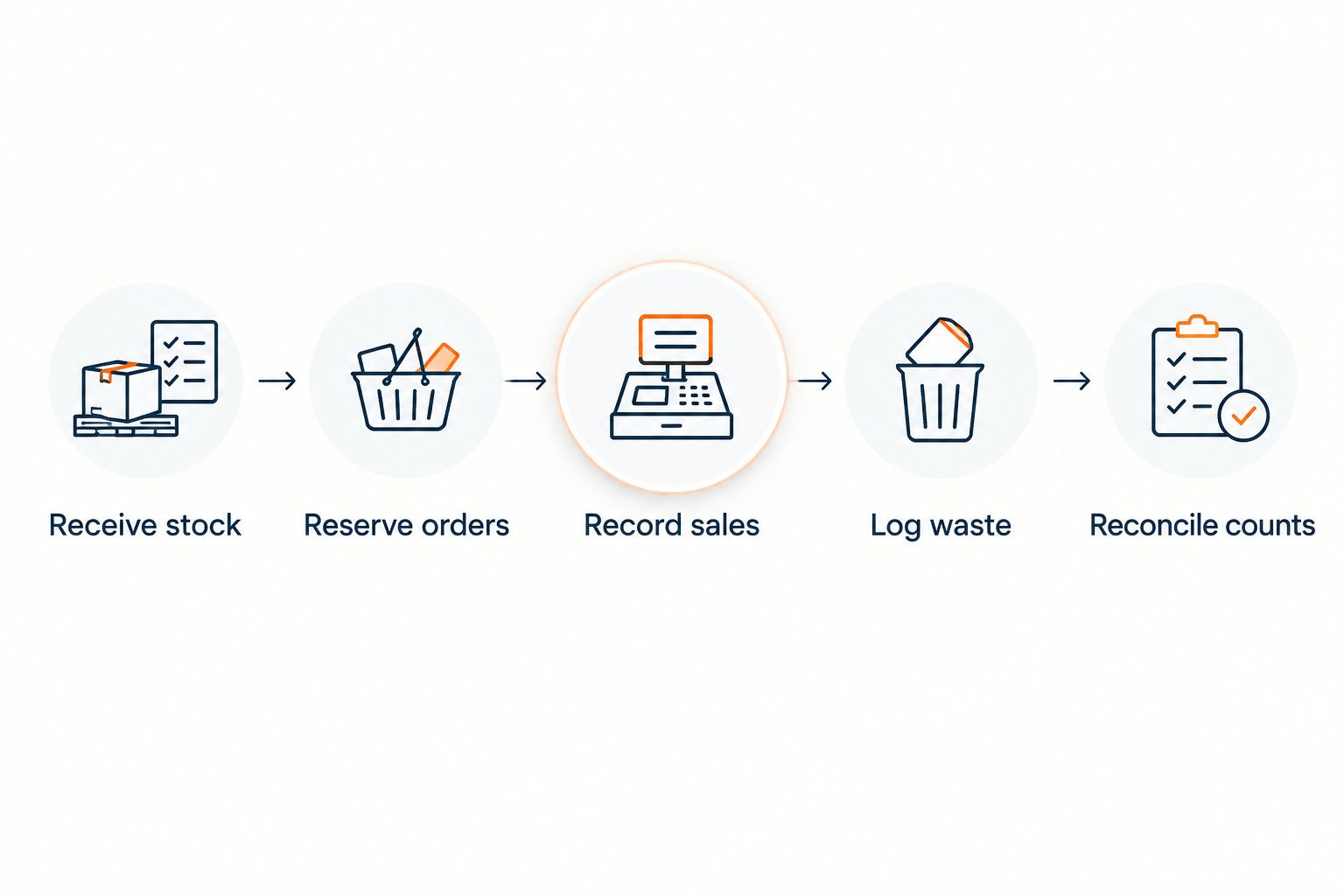
Document the following events before approving an integration:
- Receive stock: add accepted goods to the correct location.
- Reserve orders: distinguish committed quantities from completed sales.
- Record sales: deduct the actual item and transaction quantity.
- Log waste: separate disposal from sales and transfers.
- Reconcile counts: investigate differences before posting adjustments.
4. Separate perishability from dietary and merchandising attributes
Begin with a department-level expiration log and a documented rotation procedure. Employees need to know which batch to use first, what to inspect, and when to remove an item from sale. Inventory software should support the process, not become a substitute for it.
Expiration dates, supplier lots, and dietary labels solve different problems. A lot identifies a batch; an expiration field supports handling decisions; an allergen attribute describes the product. Do not combine them into a miscellaneous notes field that employees cannot consistently search or report.
Ask vendors to demonstrate the relevant capabilities on your test products. A cheese department, specialty bakery, and natural-food aisle do not necessarily need identical fields, but each needs an accountable method for maintaining product information.
Make the distinction explicit in your evaluation:
- Record lot and expiration information where your operation requires it.
- Assign responsibility for inspecting and rotating perishable goods.
- Keep allergen and dietary attributes separate from inventory quantities.
- Verify product attributes against supplier documentation and labels.
- Test how corrected product information reaches each selling channel.
5. Account for cutting, preparation, and bundles
Use a production sheet to record ingredients consumed and finished products created. Start manually with a familiar deli recipe or cheese-cutting workflow. This establishes whether your employees can record the transformation consistently before you automate it.
An inventory tool that handles packaged retail sales does not automatically handle ingredient consumption. Ask the vendor to show how a prepared-food sale affects the underlying ingredients, how actual yield differs from planned yield, and how discarded trim is recorded.
Gift baskets introduce a related issue: components must leave inventory when the bundle is assembled or sold, according to your chosen workflow. Without that rule, the same jar or cheese portion can remain counted as an individual item after becoming part of a basket.
For your 2026 evaluation, demonstrate these transformations:
- Convert a whole item into weighed portions with recorded yield.
- Consume ingredients against a prepared-food production record.
- Separate production loss from finished-product sales.
- Deduct bundle components without counting them twice.
- Reverse a production or assembly error with a traceable correction.
6. Build replenishment rules from your own records
Start with sales exports, supplier order calendars, recorded waste, and physical counts. Review them together before deciding what to reorder. Sales alone do not explain demand when an item was removed from sale, a delivery arrived late, or employees substituted another product.
Calculate replenishment needs using the quantities you actually trust. A useful starting relationship is expected demand during replenishment lead time, plus a chosen buffer, minus usable inventory and confirmed incoming quantities. Account for committed orders consistently so you do not subtract the same demand twice.
For Thanksgiving and other 2026 seasonal promotions, separate event-driven purchasing from routine replenishment. A holiday gift assortment needs a purchasing decision tied to the selling window, not an automatic continuation of the previous week’s sales pattern.
Keep the initial rules transparent:
- Record supplier order cutoffs and delivery schedules.
- Separate routine demand from promotions and seasonal events.
- Include waste records when reviewing perishable purchasing.
- Require approval for suggested orders that exceed your purchasing limits.
- Review suggested quantities against physical counts before submission.
7. Pilot the workflow and measure exceptions
Run a 4-week pilot in one department before extending the process across the store. This is a proposed implementation window, not a promised launch timeline. Choose a department with receiving, sales, and perishability challenges so the pilot tests more than basic scanning.
Establish a baseline before the pilot begins. Count the same products using the same method, record exceptions consistently, and preserve the original transactions. Comparing different assortments or changing definitions mid-pilot makes the result hard to interpret.
During the pilot, distinguish system failures from missing employee actions. A late receiving entry is a process problem; an accepted transaction that never updates inventory is a system problem. Both need correction, but they require different owners.
Use a 30-minute weekly exception review as a starting routine:
- Compare physical counts with recorded quantities for the same items.
- Review receiving discrepancies and unresolved supplier issues.
- Track substitutions, cancellations, and inventory-related fulfillment failures.
- Separate spoilage, damage, and count corrections in reporting.
- Assign each unresolved exception an owner and resolution date.
Compare your inventory-management options
Choose the operating model before choosing a vendor. The options below are approaches, not ranked products. Their benefits depend on the workflows you demonstrate and the responsibilities you assign.
| Option | Best for | Main advantage | Key limitation |
|---|---|---|---|
| Spreadsheet and documented counts | Establishing a baseline in a narrowly scoped department | Makes item definitions and exceptions visible before migration | Employees must enter and reconcile changes manually |
| POS-centered inventory | Stores whose main requirement is tracking register sales | Keeps checkout transactions close to item records | Test purchasing, production, lot handling, and online reservations separately |
| Dedicated inventory system | Grocers needing detailed purchasing, receiving, or production workflows | Centers the evaluation on inventory operations | Commerce connections require their own validation |
| Localexpress plus a validated inventory connection | Specialty grocers combining branded ecommerce, apps, and order management with inventory operations | Adds grocery commerce channels and order management | Native inventory depth and system compatibility need a demonstrated fit |
A dedicated inventory system is not automatically the right choice for every department. Extra functionality also creates more fields, permissions, and employee procedures to maintain. Match that burden to a documented operational need.
Before signing, request a written scope covering data migration, supported connections, implementation responsibilities, training, and support. Make the successful completion of your test workflows an acceptance condition rather than relying on a generic product demonstration.
Common mistakes specialty grocers make
Treating weighed products like packaged units
A count of packages cannot represent every cheese, deli, or bulk-food transaction. If your receiving unit differs from your selling unit, verify the conversion and the treatment of actual weight. Reject a workflow that requires employees to guess which quantity to enter.
Using dietary labels as substitution permission
A shared dietary tag does not make products interchangeable. Ingredients, allergens, preparation methods, and customer requirements still matter. Document substitution rules separately from merchandising tags, and make fulfillment employees confirm the shopper’s instructions.
Leaving deli production outside inventory records
Ingredient purchases and prepared-food sales belong to the same operating story. If production sits on an unrecorded paper sheet, replenishment records lose the reason those ingredients disappeared. Establish a usable production log before asking software to automate deductions.
Reordering seasonal specialty items from a short sales spike
A promotional display or holiday event changes the context of sales. Record the event and the intended selling window before increasing replenishment. For the 2026 holiday season, review leftover seasonal goods separately from year-round assortment decisions.
Assigning every exception to the inventory manager
Receiving, preparation, checkout, and online fulfillment create different exceptions. A central queue helps visibility, but it does not replace departmental ownership. Route each discrepancy to the employee who can verify the original movement and correct its cause.
FAQ
What's the best grocery store inventory management software for specialty grocers?
The best fit is the system that passes your receiving, variable-weight, perishability, production, and order-reservation tests. Use actual products and transactions from your store rather than selecting from a generic feature list.
Can I use a spreadsheet before buying inventory software?
Yes, a spreadsheet can establish item definitions, receiving procedures, and a count baseline before implementation. It still requires employees to record movements and reconcile differences manually.
Does Localexpress replace my grocery inventory system?
Localexpress provides grocery commerce functions including branded websites, mobile apps, and order management. Evaluate inventory replacement separately by requiring demonstrations of purchasing, receiving, production, and the connections your store needs.
How should inventory software handle cheese sold by weight?
It should represent your receiving and selling units accurately and record the actual quantities used in each transaction. Test cutting, yield loss, and portion sales using your own cheese-department workflow.
Do specialty grocers need lot tracking and expiration fields?
Specialty grocers should evaluate lot tracking and expiration fields wherever their products and operating requirements call for them. Keep batch identification, rotation procedures, and product attributes separate so employees can maintain each correctly.
How long should I pilot grocery inventory software?
Use a 4-week departmental pilot as a starting plan, not a guaranteed implementation timeline. Include receiving, sales, counts, and exception reviews before deciding whether the workflow is ready for broader use.
Should online orders reduce inventory immediately?
Online orders need a defined reservation rule before fulfillment. Document when inventory becomes committed, when a completed sale deducts it, and how cancellations release the commitment.
One last thing
Before your next vendor demo, take one difficult item from delivery through its final sale or disposal. Use the same item record throughout. If the vendor cannot explain every quantity change, do not approve that workflow. A polished dashboard does not resolve an unexplained movement.