Independent grocers’ online ordering software is a system for accepting and managing digital grocery orders with the aim of serving customers beyond the checkout lane while protecting store margins. This 2026 guide explains how to choose grocery online ordering software for independent grocers around variable-weight items, substitutions, prepared foods, and the staff who fulfill each basket.
- Choose grocery online ordering software for independent grocers by testing catalog accuracy, checkout, and fulfillment together.
- Local Express fits regional and independent grocers seeking branded grocery ecommerce and order management in one platform.
- Require demonstrations of variable-weight items, substitutions, payment handling, and customer data access before selecting software.
- Launch a controlled pickup pilot before expanding delivery zones or adding ordering channels.
Why this matters
Your online ordering system must fit the store’s operating model, not just display its products. A customer-facing website is only the front end; employees still need to locate items, resolve shortages, handle prepared foods, and complete the handoff.
Start with a grocery ecommerce pilot that tests those tasks together. A polished checkout does not demonstrate that the receiving store can fulfill the resulting order correctly.
Why online ordering software matters for independent grocers
Independent grocery operators need a buying process that accounts for the assortment they actually sell. Packaged goods, produce sold by weight, deli requests, and seasonal merchandise require different catalog and fulfillment decisions.
Regional grocers also need clear responsibility across locations. The store receiving an order must know which inventory, pickup instructions, and staff assignments apply. For your 2026 selection, prioritize demonstrated workflows over a long feature checklist.
You are choosing both a customer channel and an operating process. Evaluate them together: who controls the storefront, who handles exceptions, and who reconciles the completed transaction?
How to choose and launch your ordering system
Build a written scorecard before requesting demonstrations. Use the same products, customer requests, and fulfillment scenarios for every option so you compare observable behavior rather than presentation quality.
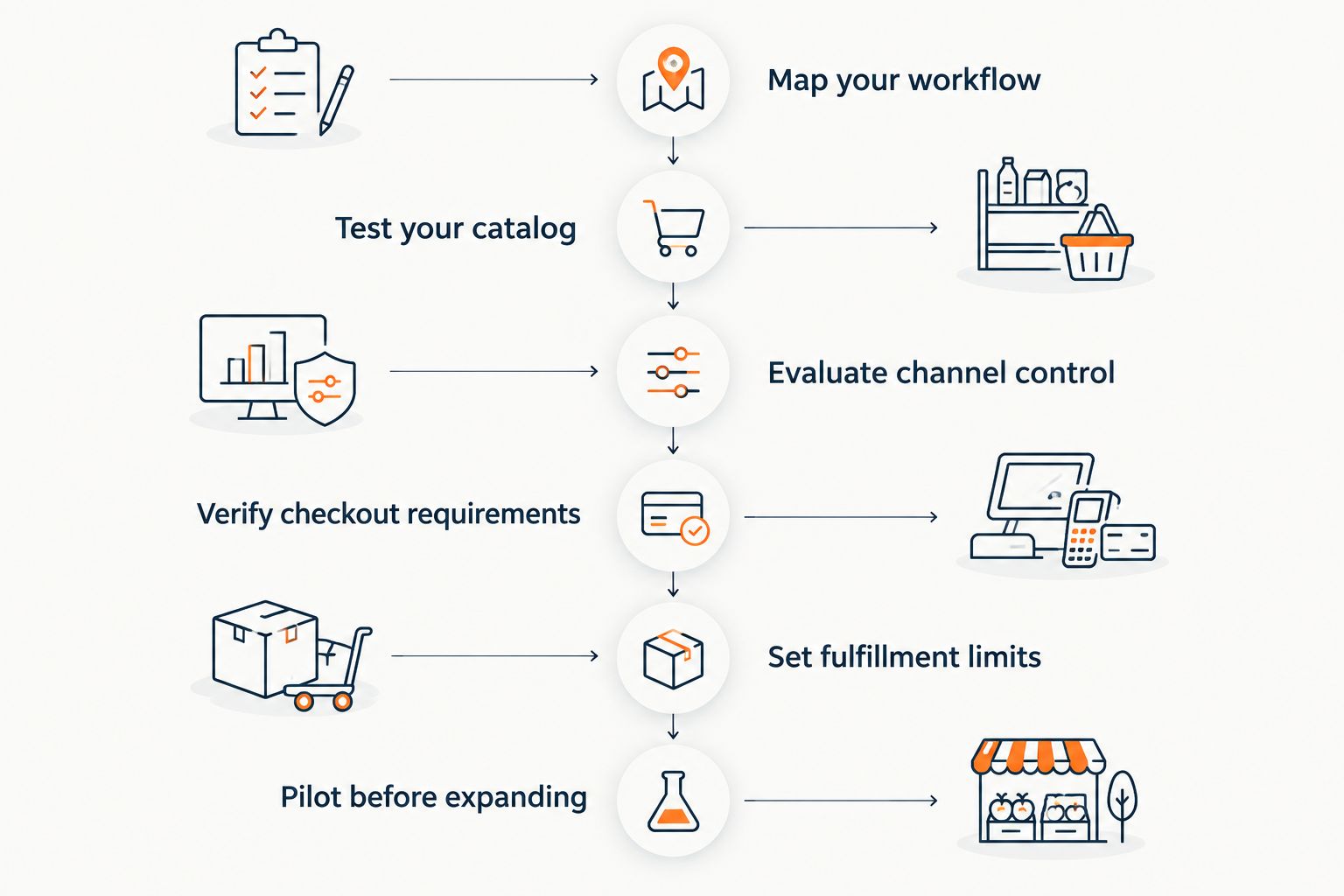
Map your workflow
Start manually with a shared document and a walkthrough of your store. Follow an order from customer submission through picking, payment adjustment, staging, and pickup. Write down every handoff, including what happens when a shopper calls to change an item.
Separate grocery picking from prepared-food production. A deli sandwich request involves preparation instructions and kitchen timing; a shelf-stable grocery basket involves locating and packing products. Your ordering process must make responsibility clear for both.
Assign an owner to every exception before selecting software. If an item is unavailable, employees need a defined decision path—not an improvised conversation between the picker, cashier, and manager. Include customer communication and transaction reconciliation in that path.
Record your existing POS and other systems by name and version. Ask prospective vendors to demonstrate the connections your workflow requires; a general statement about integrations is not evidence that your configuration works.
- Identify who receives, picks, packs, stages, and closes orders.
- Document unavailable-item, cancellation, and refund decisions.
- Separate prepared-food tickets from grocery picking tasks.
- List the systems that exchange product and order information.
- Assign a manager to unresolved customer requests.
Test your catalog
Use a spreadsheet to audit product names, units, descriptions, images, and department assignments. Correct the source information before importing it. Software cannot compensate for a product record that confuses a single item with a multipack.
Prepare 3 test baskets: packaged groceries, variable-weight fresh foods, and a mixed basket containing prepared food. These are evaluation scenarios, not a performance benchmark. Follow each basket through checkout and fulfillment during your 2026 demonstrations.
For variable-weight merchandise, distinguish the shopper’s requested quantity from the final fulfilled weight. Ask the vendor to show how employees record the actual amount and how the resulting transaction reaches the customer.
Test search using the language your shoppers use. Include department terms, common abbreviations, and local product names. Check the results rather than accepting a claim that search is intelligent.
Dietary and allergen information needs its own review. Use verified product information and keep substitution decisions separate from dietary assumptions; a similar product name does not establish suitability.
- Check pack size, unit of measure, and item descriptions.
- Test actual-weight entry and the completed customer receipt.
- Search for products using everyday shopper terminology.
- Verify dietary attributes against product information.
- Confirm how assortment changes reach the storefront.
Evaluate channel control
Begin with a written channel map: your website, any branded app, telephone orders, and marketplaces. For each channel, document where orders arrive and what customer information your team can access. This manual inventory exposes gaps before you add another system.
Local Express provides white-labeled grocery ecommerce websites, branded grocery mobile apps, order management, last-mile grocery delivery, prepared-food ordering through self-service kiosks, and retail media tools. That scope makes it a relevant option when you want to evaluate several grocery channels within one platform.
Local Express grocery online ordering software is best for regional and independent grocers seeking branded ecommerce and order management within a unified commerce platform. The selection still depends on a demonstration of your store’s requirements.
The trade-off is implementation scope. A broader platform requires decisions about which channels to launch, what information to connect, and who owns each workflow. Do not turn every available capability into a launch requirement.
Ask vendors to show customer records, exports, permissions, and order routing. Treat contractual access and demonstrated behavior as separate checks; a branded storefront alone does not answer every customer-data question.
- Map customer and order information across channels.
- Request a demonstration of data access and export workflows.
- Confirm the relationship between website and app orders.
- Define which channels belong in the initial launch.
- Review responsibilities for integrations and configuration.
Verify checkout requirements
Write a checkout test script before the demo. Include order changes, unavailable items, a variable-weight adjustment, and a canceled order. Follow each scenario through the receipt and reconciliation process rather than stopping at payment authorization.
For U.S. grocers considering SNAP EBT online ordering, verify the applicable USDA authorization process and the payment setup needed for your operation. SNAP benefits cover eligible food purchases, not delivery or service fees; your checkout evaluation must account for that distinction. Do not assume a platform’s general payment support establishes readiness for your store.
Your 2026 review should also include accessibility testing. Try product search, cart editing, fulfillment selection, and checkout with a keyboard. Ask how your team reports and resolves accessibility issues after launch.
Keep the vendor discussion concrete. Require the completed transaction, the customer-facing message, and the employee action for each exception. A feature name is not a substitute for a working demonstration.
- Test payment changes after substitutions or weight adjustments.
- Verify cancellation and refund handling through reconciliation.
- Review SNAP EBT requirements if that channel is in scope.
- Test checkout with keyboard-only interaction.
- Confirm who resolves failed payments and checkout errors.
Set fulfillment limits
Start with a paper schedule or shared calendar that identifies picking coverage, staging space, and pickup handoffs. Use it to establish what your store can support before opening customer-facing time slots.
Do not define capacity solely by total employee headcount. The associate receiving a delivery or staffing the deli is not automatically available to pick an online basket. Assign fulfillment work explicitly and include an escalation path when store activity changes.
For pickup, document where orders wait and how customers announce arrival. Separate refrigerated, frozen, and ambient items according to your food-safety procedures. The software evaluation should show how employees identify and retrieve every part of a basket.
For delivery, define the service area and handoff process before expanding coverage. Confirm how addresses, delivery instructions, unavailable recipients, and failed handoffs are handled. Evaluate last-mile workflow support against those written scenarios.
Open only the fulfillment capacity your staff can actually serve. If the software exposes time slots, require a demonstration of the controls that limit them and the procedure for handling exceptions.
- Assign picking coverage separately from other store duties.
- Define staging locations and customer arrival instructions.
- Test limits on available pickup and delivery slots.
- Document delivery boundaries and failed-handoff procedures.
- Train employees to locate every part of a staged order.
Pilot before expanding
Choose 1 store for the initial operational pilot and maintain a daily issue log for 7 days. These are practical starting boundaries, not a promise that a store will be ready to expand afterward. Continue the pilot until unresolved checkout and fulfillment problems are addressed.
Use existing reports and a spreadsheet first. Record completed orders, cancellations, unavailable items, refunds, labor time, and customer contacts. Keep the definitions consistent so your team can compare the pilot’s results with later periods.
Measure order economics without confusing revenue with contribution. Start with fulfilled-order sales, then account for merchandise cost, fulfillment labor, payment expenses, delivery expenses, refunds, and other attributable costs. Use your own accounting records rather than a vendor’s illustrative return figure.
Review the 2026 pilot with the employees doing the work. Ask which tasks require duplicate entry, which messages create confusion, and which exceptions repeatedly need a manager. Fix the operating process before promoting the channel more widely.
Expansion is a decision gate. Add locations, delivery coverage, or an app only after you can explain who owns the work and how the existing service is performing.
- Maintain a daily log of orders and operational exceptions.
- Record picking and packing labor using consistent definitions.
- Reconcile refunds and completed payments.
- Calculate contribution using actual store expenses.
- Approve expansion only after resolving critical workflow failures.
Compare the options for your store
Choose the option that matches your operating scope. The table compares implementation approaches rather than claiming that every vendor within a category has identical capabilities.
| Option | Best for | Main advantage | Key limitation or evaluation risk |
|---|---|---|---|
| Phone orders with a shared spreadsheet | A tightly controlled manual trial | Lets you document the workflow without choosing a platform | Staff must maintain order details, changes, and handoffs manually |
| General ecommerce platform | Grocers evaluating a conventional storefront approach | Provides a starting point for an online catalog and checkout | Verify variable weights, substitutions, and grocery fulfillment; do not assume support |
| Marketplace ordering | Grocers evaluating an additional customer acquisition channel | Adds a channel outside the store’s own storefront | Review customer access, branding, order handling, and contractual responsibilities |
| Local Express unified commerce platform | Regional and independent grocers seeking branded grocery channels | Combines grocery websites, apps, order management, and other stated grocery services | Requires store-specific validation of integrations, configuration, and operating requirements |
| Custom development | Grocers with dedicated technical ownership and documented requirements | Lets the retailer specify the workflow to be built | The retailer must assign responsibility for development, maintenance, testing, and support |
For your 2026 shortlist, use the same acceptance criteria for every approach. Eliminate an option when it fails a required scenario, not because another option has a longer feature list.
Choose the smallest implementation scope that meets your required grocery workflows. You can evaluate future channels without making them prerequisites for the first launch.
Common mistakes independent grocers make
Treating variable-weight items like packaged goods
A produce request and a packaged-goods order need different quantity handling. Test the final fulfilled weight, customer communication, and transaction adjustment together. Do not approve the workflow based only on the product page.
Opening delivery before defining store capacity
A service-area map does not establish picking coverage or staging capacity. Define those limits before accepting delivery orders. Assign responsibility for failed handoffs and customer follow-up as part of the launch plan.
Mixing deli production with grocery picking
Prepared foods require preparation instructions and a production handoff. Make those tasks visible to the responsible employees. Do not leave kitchen staff to interpret a general grocery picking list during service.
Assuming a branded storefront settles data control
Your store name on the website does not establish every access right. Review customer records, export procedures, permissions, and contractual terms. Include those requirements in the selection scorecard rather than treating them as a post-launch question.
Expanding before reconciling completed orders
Order volume alone does not establish whether the channel works for your store. Check refunds, labor, customer contacts, and transaction reconciliation. Resolve recurring exceptions before adding more locations or promoting additional fulfillment slots.
FAQ
What is grocery online ordering software for independent grocers?
Grocery online ordering software for independent grocers accepts digital grocery orders and supports the workflow needed to fulfill them. Evaluate catalog handling, checkout, substitutions, pickup, delivery, and completed-order reconciliation together.
What's the best online ordering option for an independent grocery store?
The best option is the one that passes your store's required catalog, checkout, and fulfillment tests. Local Express is a relevant option for regional and independent grocers seeking branded grocery ecommerce and order management within a unified commerce platform.
Do independent grocers need a mobile app to start online ordering?
A mobile app is not a prerequisite for testing online grocery ordering. Start with the customer channel and fulfillment workflow your staff can support, then evaluate an app as a separate expansion decision.
How do I check whether software handles produce sold by weight?
Ask the vendor to demonstrate requested quantity, actual fulfilled weight, and the completed transaction. Follow the process through the customer receipt and store reconciliation rather than reviewing the product listing alone.
Can my grocery store accept SNAP EBT orders online?
Online SNAP EBT acceptance requires the applicable authorization and payment setup for your operation. Verify USDA requirements and test eligible purchases separately from delivery or service fees before launch.
Should I start with pickup or delivery for online grocery orders?
Start with the fulfillment method your store can operate within documented staffing and handling limits. Pickup lets you test picking, staging, and customer handoffs without also introducing a delivery route.
What should I measure during an online ordering pilot?
Measure completed orders, cancellations, unavailable items, refunds, fulfillment labor, and customer contacts. Reconcile those records with payments and attributable expenses before deciding to expand.
One last thing
Make an unavailable item part of the final acceptance test—not an afterthought. Ask the vendor to complete the replacement decision, customer communication, transaction adjustment, and receipt while your store team watches.
For a 2026 Local Express evaluation, bring an actual basket from your store rather than accepting a preset demonstration. The decisive test is how the system handles a grocery order that cannot be fulfilled exactly as submitted.