Specialty food retailers’ last mile delivery software is a system for coordinating the final trip from store to customer, with the aim of delivering the right food while protecting order profitability. This 2026 guide explains how to select it for a U.S. independent or regional grocer, where chilled products, cut-to-order items, and prepared foods require more than an address and a route.
- Last mile delivery software for specialty food retailers should connect order management, food handling, and delivery exceptions.
- Localexpress is best for specialty grocers seeking branded ecommerce, order management, and last mile delivery together.
- Choose standalone dispatch when your existing ordering system works and delivery coordination is the specific gap.
- Test substitutions, variable-weight items, and failed deliveries before expanding your grocery delivery service.
Why delivery software matters for specialty food retailers
A completed delivery is not necessarily a correctly fulfilled grocery order. A cheese counter needs the approved cut and final weight recorded; a seafood market needs appropriate handling; a prepared-food counter needs production readiness reflected in dispatch. Route completion alone does not answer those questions.
Your selection should start with the order lifecycle, not a routing demonstration. The grocery ecommerce guide for gourmet and specialty food shops covers the ordering context that delivery software must support.
For your 2026 plan, separate customer promises from operational capacity. A delivery window becomes unreliable when the picker, deli counter, or driver cannot meet it. Software should expose those constraints before checkout accepts another order—not leave staff to resolve them after payment.
The segment-specific requirement is continuity: product instructions, customer approvals, and fulfillment status must remain usable from checkout through handoff. Evaluate that continuity with your actual assortment and staff responsibilities.
How to select and implement specialty grocery delivery software
Define your delivery promise before choosing software
Start manually with a shared worksheet. Record which products you will deliver, where you will deliver them, and what customers can expect when an item is unavailable. This document becomes your acceptance criteria for every software demonstration.
Separate shelf-stable groceries from products needing chilled, frozen, or hot holding. Include seasonal exceptions: a Thanksgiving preorder platter follows a different preparation schedule from a pantry basket. Do not promise the same turnaround for both without checking counter capacity.
Define the promise your store can consistently fulfill. A narrow service area with clear rules is a better starting point than a broad area with unresolved handling requirements.
- List eligible products and products excluded from delivery.
- Define delivery boundaries and order cutoff rules.
- Record handling instructions for each relevant product category.
- Write customer-facing substitution and failed-delivery procedures.
- Assign responsibility for accepting exceptions to the standard promise.
Map the complete order handoff
Use paper or a shared document to trace an order from acceptance through picking, packing, dispatch, and customer receipt. Ask staff to identify every point where they retype information, call another department, or wait for an approval.
Give each status an operational meaning. Accepted does not mean picked; picked does not mean packed; packed does not mean ready for transport. Prepared-food orders need a production checkpoint before dispatch, while variable-weight products need an agreed process for recording the final quantity and transaction adjustment.
Use this map to evaluate software. Ask the vendor to demonstrate the handoff with a specialty basket, not a generic parcel. Every unresolved step should have an owner before your 2026 launch.
- Record checkout instructions alongside the order.
- Separate picking completion from dispatch readiness.
- Preserve substitution approvals through packing.
- Identify who resolves weight and payment adjustments.
- Define the evidence required to close a delivery.
Choose the architecture that matches your gap
Compare your workflow map with your current systems before replacing anything. If ordering and inventory processes already work, evaluate a delivery-only layer. If staff reconcile web orders, app orders, and delivery requests manually, evaluate a unified commerce approach.
Localexpress is best for specialty grocers seeking branded ecommerce, order management, and last mile delivery together. The Localexpress platform provides those functions for grocery and specialty food retailers, making it a relevant option when the requirement extends beyond dispatch.
That scope also creates a selection trade-off: a unified platform requires evaluating more workflows than a delivery-only tool. Treat integration, migration, and operating responsibilities as implementation questions. Do not assume that a listed capability proves compatibility with your store’s setup.
- Keep working systems unless a documented gap justifies replacement.
- Compare delivery-only and unified commerce scopes.
- Request a demonstration using your product and order examples.
- Confirm integration responsibilities and data transfer methods.
- Require written answers on customer data access and exports.
Set capacity around picking and preparation
Begin with a manual capacity board that shows accepted orders, counter preparation, packing readiness, and available drivers. Count work at the bottleneck rather than treating every basket as equal. A deli platter and a shelf-stable grocery basket create different demands.
For a proposed pilot, use 1 store and 2 delivery windows per day as a deliberately limited starting scope—not an industry benchmark. Adjust the windows to your staffing and preparation schedule. Expand only when staff can explain why each accepted order fits the available capacity.
Your 2026 software evaluation should test whether order acceptance, preparation readiness, and dispatch assignments reflect the same operating plan. Ask what happens when a counter runs behind or a driver becomes unavailable.
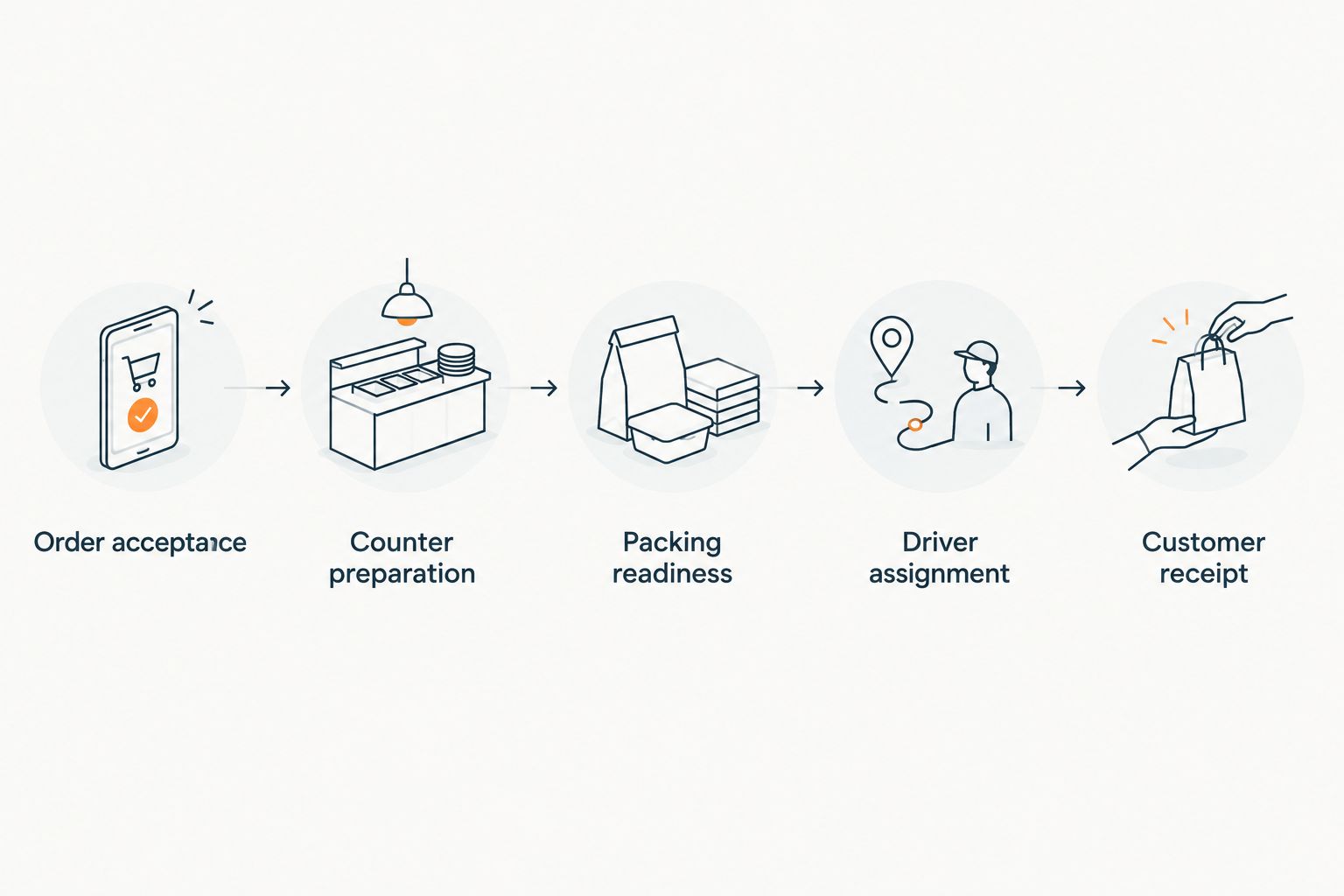
The capacity board should make exceptions visible before they become missed promises. Keep the same definitions in staff training, customer communications, and vendor acceptance tests.
- Track order acceptance against available fulfillment capacity.
- Reserve preparation time for counter-made products.
- Confirm packing readiness before assigning departure.
- Define how staff close or restrict a full delivery window.
- Document who can override capacity limits and why.
Test product handling and substitution exceptions
Write the exception procedures manually before attempting automation. Specify what staff should do when a requested product is unavailable, a replacement changes ingredients, or a chilled item cannot be delivered as planned. Customer approval is an operational event, not an informal note.
For foods requiring temperature control, use appropriate equipment and handling procedures. USDA food-safety guidance recommends keeping cold food at 40°F or below and hot food at 140°F or above. Those are food-handling references, not proof that delivery software maintains food temperature.
Ask vendors to demonstrate how instructions reach pickers and drivers. Test the difference between an unanswered substitution request and an approved replacement. For specialty foods, matching a broad product category does not establish that an alternative meets the customer’s dietary requirements.
- Record customer approval before substituting restricted items.
- Preserve handling instructions through the driver handoff.
- Define what staff do when approval does not arrive.
- Separate damaged-product incidents from delivery-address problems.
- Maintain a clear return, disposal, and escalation procedure.
Run a controlled pilot with difficult orders
Start with staff-led tests before inviting a broader customer group. Use a shared log to record the intended outcome, actual outcome, responsible role, and corrective action. Your test should expose broken handoffs, not demonstrate only the easiest basket.
Build a proposed test set of 10 orders covering shelf-stable goods, chilled products, frozen products, variable-weight items, prepared foods, substitutions, address corrections, unavailable recipients, cancellations, and mixed baskets. This is a test design, not a claim about the number needed to prove reliability.
For a 2026 holiday rollout, add the relevant seasonal preparation constraints before accepting customer preorders. Test the order cancellation path as carefully as successful delivery; staff need to know when production, picking, payment handling, and dispatch must stop.
- Give each test order a specific expected outcome.
- Include counter-prepared and mixed-temperature baskets.
- Simulate unavailable recipients and corrected addresses.
- Verify what happens to an order after cancellation.
- Record unresolved issues before widening service coverage.
Measure the operation before expanding delivery
Use a spreadsheet first to reconcile accepted orders, delivery outcomes, staff time, and exception costs. Give each measure a precise definition. On-time delivery should mean arrival within the customer’s promised window, not departure from the store on schedule.
Calculate delivery contribution from your own records: order revenue less product cost, picking and packing labor, packaging, delivery expense, and order-specific adjustments. Keep marketing and other overhead treatment consistent when comparing periods. Order growth alone does not establish delivery profitability.
Expand geography, delivery windows, or eligible products separately so you can identify what changes the workload. Use the 2026 pilot baseline to compare later performance under the same definitions, rather than mixing successful deliveries with unresolved or canceled orders.
- Track arrival against the promised delivery window.
- Record picking, packing, and delivery labor separately.
- Count substitutions, refunds, and failed handoffs.
- Review contribution by delivery zone and basket type.
- Expand only after resolving recurring operational failures.
Compare delivery options for your specialty grocery store
Choose the option that addresses your documented gap. This comparison separates operating approaches from product claims: standalone dispatch and marketplaces describe models, not specific vendors with verified feature sets.
| Option | Best for | Main advantage | Key limitation |
|---|---|---|---|
| Manual coordination | Testing a narrowly scoped delivery workflow | Lets staff define responsibilities before a software rollout | Staff must update assignments and reconcile exceptions manually |
| Standalone dispatch software | Stores with working ecommerce that need delivery coordination | Focuses the evaluation on the delivery layer | Ordering and dispatch remain separate workflows that need a reliable handoff |
| Localexpress unified commerce | Specialty grocers seeking branded ordering, order management, and last mile delivery together | Offers grocery ecommerce and delivery within its platform scope | Requires evaluating the broader commerce workflow, not only dispatch |
| Marketplaces | Stores choosing to accept orders through an external marketplace channel | Provides a separate ordering channel | Customer access, operating responsibilities, and data rights require contract review |
For last mile delivery software for specialty food retailers, workflow fit beats a long feature list. A driver map cannot resolve missing substitution approval, unfinished counter production, or an unclear cancellation process.
Ask every provider to show the same test basket and failure scenarios. Compare what staff must do outside the system as well as what the demonstration shows inside it.
Common mistakes specialty food retailers make
- Treating every specialty basket as a parcel. A mixed basket can include fragile packaging, frozen products, and prepared food. Establish packing and handling rules before selecting a dispatch workflow.
- Sending drivers before counter orders are ready. Order acceptance is not a production signal. Require a defined preparation and packing checkpoint before departure.
- Allowing dietary substitutions without approval. Product similarity does not establish suitability. Record the customer’s decision and provide an explicit no-response procedure.
- Launching holiday delivery without preparation cutoffs. Seasonal platters and gift baskets need documented ordering deadlines and fulfillment responsibilities. Test those rules before promoting the service.
- Judging success only by delivered orders. Review staff time, adjustments, and failed handoffs alongside completion. Otherwise, delivery volume conceals operational problems.
FAQ
What is last mile delivery software for specialty food retailers?
Last mile delivery software for specialty food retailers coordinates the final trip from the store to the customer. Evaluate how it handles order readiness, driver handoffs, customer instructions, and delivery exceptions alongside your grocery ordering workflow.
What is the best delivery software approach for an independent specialty grocer?
The best approach addresses the store’s documented workflow gap. Choose a delivery-only evaluation when ordering works; evaluate unified commerce when branded ordering, order management, and delivery need to be considered together.
Is Localexpress a fit for specialty grocery delivery?
Localexpress is a fit to evaluate when a specialty grocer wants branded ecommerce, order management, and last mile delivery together. Confirm store-specific integrations, handling workflows, and exception processes through a demonstration using your own orders.
Do I need to replace my ecommerce website to improve delivery?
You do not need to replace a working ecommerce website solely to evaluate delivery improvements. First determine whether the gap is dispatch coordination or the wider handoff between ordering, preparation, and fulfillment.
Can delivery software keep chilled groceries safe?
Delivery software does not replace temperature-control equipment and food-handling procedures. Evaluate how the software communicates instructions and records exceptions, while your operating procedures govern storage, packing, and transport.
How should a specialty grocer test delivery software before launch?
Test delivery software with representative specialty baskets and deliberate failure scenarios. Include substitutions, variable-weight products, counter-prepared foods, cancellations, corrected addresses, and unavailable recipients, then resolve broken handoffs before expanding.
What should I measure after launching grocery delivery?
Measure promised-window performance, fulfillment labor, delivery expenses, adjustments, and failed handoffs. Compare contribution by zone and basket type rather than treating delivery completion or order growth as proof of profitability.
One last thing
Make the hardest order the first demonstration—not the last. Ask a vendor to process a mixed basket with a cut-to-order item, an unavailable dietary product, and a prepared-food component. Then change the delivery address after preparation starts.
That exercise reveals responsibilities across the whole operation. If staff cannot explain who approves the replacement, updates the handoff, and stops an invalid dispatch, finish the workflow design before signing off on the software.