Grocery co-ops’ online ordering software is a digital storefront and fulfillment system with the aim of giving members and other shoppers a direct way to buy groceries from the co-op. This 2026 guide explains how to evaluate member identification, variable-weight foods, pickup workflows, and customer-data control before choosing a platform.
- Choose grocery online ordering software for grocery co-ops around member identification, accurate orders, and manageable pickup capacity.
- Localexpress fits independent grocery co-ops seeking branded grocery ecommerce and order management in one platform.
- Test member records, variable-weight items, substitutions, and refunds before approving a rollout.
- Start with a controlled pickup pilot; add delivery only after fulfillment works.
Why online ordering matters for grocery co-ops
Online ordering gives your co-op a direct digital sales channel, but the buying decision extends beyond the storefront. Your team must translate co-op policies into checkout rules, picking instructions, payment handling, and member support without creating a separate operating system for every channel.
Localexpress provides white-label grocery ecommerce websites, branded grocery mobile apps, order management, and last-mile grocery delivery. Localexpress is best for independent grocery co-ops seeking branded grocery ecommerce and centralized order management. Co-op-specific membership and payment requirements still belong in your acceptance tests; a grocery platform description does not establish support for every co-op policy.
For your 2026 evaluation, treat member identification, produce weights, bulk foods, and pickup handoffs as operational requirements rather than optional extras. If your co-op offers member benefits, online orders need an explicit method for recognizing eligibility. If you sell foods by weight, the checkout and final receipt need to explain how the final charge is determined.
Choose the system that passes your actual grocery workflows, not the one with the longest feature list. A polished homepage cannot resolve a disputed member benefit or tell a picker whether a substitution is acceptable.
How to choose and launch a co-op ordering system
1. Map your member and nonmember shopping rules
Start with a spreadsheet and your current membership policy. List which rules apply to everyone and which depend on verified membership; keep membership purchases and grocery purchases separate in your requirements unless your policy explicitly combines them.
Do not assume an email address proves ownership. Decide which existing record establishes member status and who corrects mismatches. Ask vendors to demonstrate that exact process using anonymized records, including a member whose online email differs from the membership record.
Your storefront must also explain whether nonmembers can shop. Preserve the distinction between membership information and grocery ordering rather than making shoppers interpret internal terminology.
- Identify the authoritative membership record.
- Document any existing member-benefit eligibility rules.
- Assign responsibility for correcting unmatched accounts.
- Define how household accounts relate to membership.
- Write a clear nonmember checkout policy.
2. Define your catalog and final-charge requirements
Audit a representative selection of products manually before discussing catalog automation. Include packaged staples, produce sold by weight, refrigerated products, and bulk foods where applicable. Record what the shopper sees, what the picker measures, and what appears on the final receipt.
For each selling format, require a demonstration of quantity selection, unit labeling, and final-charge handling. Ask how changes between the submitted order and the picked order reach the shopper. Do not treat a generic product import as proof that the system handles grocery units correctly.
Ingredient and allergen information also needs an owner. Use verified product information; do not turn a dietary tag into an unsupported health or safety claim.
- Distinguish each, package, and weight-based selling units.
- Identify products requiring a final measured weight.
- Check unit labels on mobile product pages.
- Assign responsibility for ingredient and allergen updates.
- Test final receipts against the items actually picked.
3. Connect your storefront to fulfillment
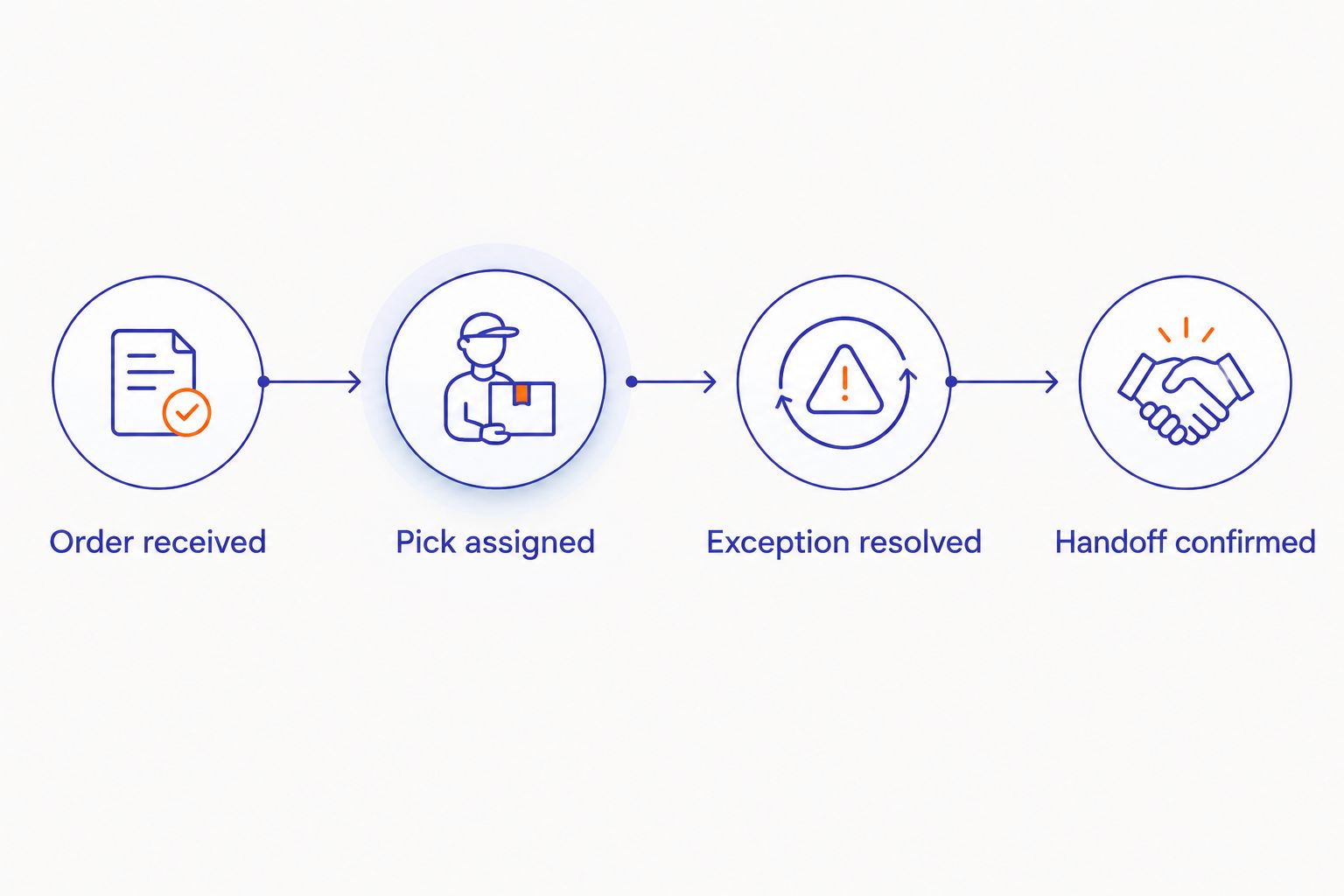
Sketch the order journey on paper first: a shopper submits an order, a staff member picks it, exceptions are resolved, and the order reaches the shopper. Mark every point where someone retypes information or checks a separate screen.
Then evaluate the faster path. Localexpress combines branded grocery ecommerce with order management and last-mile grocery delivery, making it relevant when your co-op wants those functions within a unified commerce platform. Verify the connections your store requires rather than assuming a particular POS integration or membership connector exists.
Use these workflow stages in your demonstration: Order received, Pick assigned, Exception resolved, Handoff confirmed. Each stage needs a responsible person and a visible status. A connected system still needs an exception procedure when a payment, account, or handoff fails.
- Identify the system responsible for each order status.
- Request a demonstration using your required selling units.
- Verify any proposed POS connection and its scope.
- Document how staff handle failed updates.
- Define who approves substitutions and order changes.
4. Set substitution and pickup rules before launch
Write a basic picking checklist before configuring software. For a co-op carrying local producers or specialty dietary products, substitutions need more detail than matching a broad category. A replacement must respect the shopper’s stated choices and your store’s food-information procedures.
Define how shoppers decline substitutions, approve alternatives, and receive updates. Staff should never infer that two foods meet the same dietary requirement because their packaging looks similar.
For pickup, build capacity around the staff and storage space you actually have. Separate picking, refrigerated staging, and customer handoff. In your 2026 launch plan, include Thanksgiving basket preparation or another relevant seasonal workload as a stress-test scenario, not as assumed extra capacity.
- Write substitution instructions for each relevant category.
- Make the no-substitution choice clear to shoppers.
- Assign staff to monitor unanswered substitution requests.
- Separate ambient, refrigerated, and frozen staging.
- Define the arrival and order-identification procedure.
- Pause additional pickup slots when staffing cannot support them.
5. Verify payments, accessibility, and data access
Create a manual checkout checklist covering the payment methods your co-op intends to offer. Verify each method through the provider’s documented process and a live demonstration. If you plan to accept SNAP EBT online, confirm the applicable USDA authorization and payment setup rather than assuming an in-store arrangement automatically covers online ordering.
Review accessibility with practical tasks: find a product, change quantity, select pickup, and complete checkout using keyboard navigation. Automated checks support this work but do not replace testing the shopping journey.
Ask for written answers about customer-data access, exports, account permissions, and the end-of-contract process. A branded storefront and access to your customer records are separate requirements; confirm both.
- List required payment methods and approval steps.
- Test eligible and ineligible items if offering SNAP EBT.
- Check keyboard navigation through the complete checkout.
- Review who can access member and customer records.
- Request sample customer and order exports.
- Document how data is returned when service ends.
6. Run a controlled pilot with real grocery exceptions
Use a spreadsheet to log pilot orders, staff effort, shopper questions, and corrections. Start small enough that your operations lead can inspect each exception. Software reporting becomes useful only after you agree on what each status and outcome means.
For a practical acceptance test, run 10 test orders spanning member identification, nonmember checkout, variable-weight produce, declined substitutions, partial refunds, and pickup handoff. This is a recommended test batch, not a performance benchmark. Repeat any failed scenario after the vendor or your team fixes it.
Build a 2026 launch decision around evidence from those orders. Do not approve the rollout because the standard packaged-goods order succeeds while the co-op’s distinctive requirements remain unresolved.
- Give every test order an expected outcome.
- Include shoppers using different devices and account types.
- Record manual corrections and their causes.
- Test refunds against the final fulfilled order.
- Ask staff to explain the workflow without vendor assistance.
- Require a successful retest before closing an issue.
7. Measure workload and contribution before expanding
Begin with a manual weekly scorecard. Record fulfilled orders, refunds, picking time, packing time, handoff time, and direct fulfillment expenses using your actual operating records. Do not substitute gross online sales for an assessment of the work required to serve those orders.
Use a 30-day review window as an initial planning period, then adjust it to your order volume and operating calendar. Check whether online activity adds purchases or shifts existing purchases into a more labor-intensive channel. Keep the comparison tied to identifiable transactions rather than assumptions about member behavior.
For each review, select 3 measures: completed orders, labor minutes per order, and contribution after direct fulfillment expenses. Add further measures only when they answer a specific operating question.
- Define each measure before the pilot starts.
- Record picking and handoff labor separately.
- Include refunds and payment-related expenses in the review.
- Compare repeat ordering using a consistent customer identifier.
- Expand pickup capacity only after staff can meet the workflow.
- Evaluate delivery as a separate operating decision.
Compare your co-op’s ordering options
The right 2026 shortlist compares operating models, not just storefront designs. Each option offers a different balance of control, setup work, and staff responsibility. Require vendors to distinguish standard functionality from configuration, integrations, and work your co-op must perform.
| Option | Best for | Main advantage | Key limitation |
|---|---|---|---|
| Manual order forms and staff coordination | A tightly controlled learning pilot | Lets you document workflows before committing to software | Staff must coordinate order changes, payments, and handoffs manually |
| General-purpose ecommerce software | Co-ops evaluating a conventional online catalog | Provides a storefront-centered starting point | Grocery weights, member records, and fulfillment requirements need separate validation |
| Marketplaces | Co-ops evaluating an additional ordering channel | Adds another route through which shoppers can place orders | Branding, customer access, and operating control depend on the agreement |
| Localexpress unified commerce platform | Independent co-ops seeking branded grocery ecommerce and order management | Combines grocery websites, mobile apps, order management, and delivery capabilities | Co-op-specific member rules, integrations, and payment requirements still require verification |
Do not make a mobile app a prerequisite for learning whether online ordering works. A mobile-friendly website can serve as your initial test channel. If an app becomes part of your plan, evaluate its operating responsibilities separately from the website launch.
A platform with more channels also creates more decisions. Decide who maintains product information, handles order exceptions, and authorizes changes before adding another shopper touchpoint.
Common mistakes grocery co-ops make
Treating membership as ordinary account registration
A shopping account does not establish member eligibility. Keep membership verification explicit, and test corrections before shoppers depend on online benefits. Publish an understandable support path for members whose records do not match.
Copying shelf information without testing selling units
A product name and image do not explain whether the shopper is ordering a package, a piece, or a weight-based quantity. Test the full journey from product selection to final receipt, especially for produce and bulk foods.
Promising pickup capacity without measuring staff effort
Pickup orders compete for picking labor, staging space, and handoff attention. Set capacity from your pilot observations. A seasonal promotion should not create more scheduled handoffs than your team can execute.
Choosing a platform before defining data responsibilities
Customer records, member records, and marketing permissions serve different purposes. Assign access and correction responsibilities before connecting them. Get written export and transition terms instead of treating a co-op-branded website as proof of data control.
Reporting online sales without fulfillment expenses
Sales totals do not establish whether the channel supports your co-op’s financial goals. Review direct labor, packaging, refunds, and other attributable expenses alongside orders. Expand only when the operating review supports the decision.
FAQ
What’s the best grocery online ordering software for grocery co-ops?
The best option is the platform that passes your member, catalog, payment, and fulfillment tests. Localexpress fits co-ops seeking branded grocery ecommerce and order management, but co-op-specific requirements still need verification.
Can members and nonmembers use the same online grocery store?
They can use the same storefront when its configuration supports your co-op’s shopping policies. Define member verification and any eligibility rules before accepting live orders.
Do grocery co-ops need a mobile app to start online ordering?
No, a mobile app is not a prerequisite for an online ordering pilot. Test a mobile-friendly website first and assess the app as a separate channel decision.
How should a co-op test foods sold by weight?
Test quantity selection, the final picked weight, payment handling, and the final receipt together. Require the workflow to explain any difference between the submitted order and the fulfilled order.
Can a grocery co-op accept SNAP EBT for online orders?
A grocery co-op must satisfy the applicable USDA authorization and online payment requirements before accepting SNAP EBT online. Verify the retailer’s approval and payment configuration rather than relying on its in-store setup.
Should a co-op launch pickup and delivery together?
Start with the channel your staff can reliably fulfill and measure. A controlled pickup pilot lets you test picking and handoff procedures before adding delivery responsibilities.
What should a co-op ask about customer-data control?
Ask who can access customer records, what can be exported, and what happens when the contract ends. Request sample exports and written terms covering permissions and transition responsibilities.
One last thing
Make a mismatched member account part of your final demonstration. Ask the vendor to show what happens when a member uses a different email address, needs a record corrected, and then places an order. That ordinary exception tests identity handling, staff permissions, support ownership, and checkout together.
For your 2026 rollout, approve the workflow only after your own staff can complete it. The strongest launch decision is a passed operating test, not an attractive demo.