Grocery fulfillment runs on hourly labor, and matching headcount to a 6 p.m. delivery surge or a Saturday pickup rush is the single biggest lever independent and regional grocers have over labor cost. This guide ranks six workforce scheduling platforms built for that kind of order-driven staffing pattern in 2026.
- Deputy is the best overall workforce scheduling software for grocery fulfillment in 2026, built for multi-location compliance and shift coverage.
- 7shifts is the strongest fit for deli counters and made-to-order kitchens tracking labor against sales in real time.
- Legion Technologies pairs AI demand forecasting with scheduling for chains with heavy order-volume swings.
- Homebase is the best budget option for a single-location independent grocer running a small hourly team.
Why this matters
Grocery fulfillment adds a shift pattern that most retail scheduling tools were never built for: pickers, packers, and drivers whose hours move with order volume, not just foot traffic. Get the schedule wrong and you either overstaff a slow Tuesday afternoon or leave a Saturday delivery window two pickers short. The Local Express guide to planning delivery staffing and vehicle needs for a grocery fleet starts with the volume forecast; the workforce scheduling software below is what turns that forecast into an actual shift board.
Labor typically runs 10% to 12% of grocery revenue, the second-largest cost line after cost of goods sold. A scheduling tool that trims even a few shift-hours a week compounds fast across a full year of operations, which is why the choice matters more in 2026 than it did when online order volume was a rounding error on the P&L.
What makes the best workforce scheduling software for grocery fulfillment
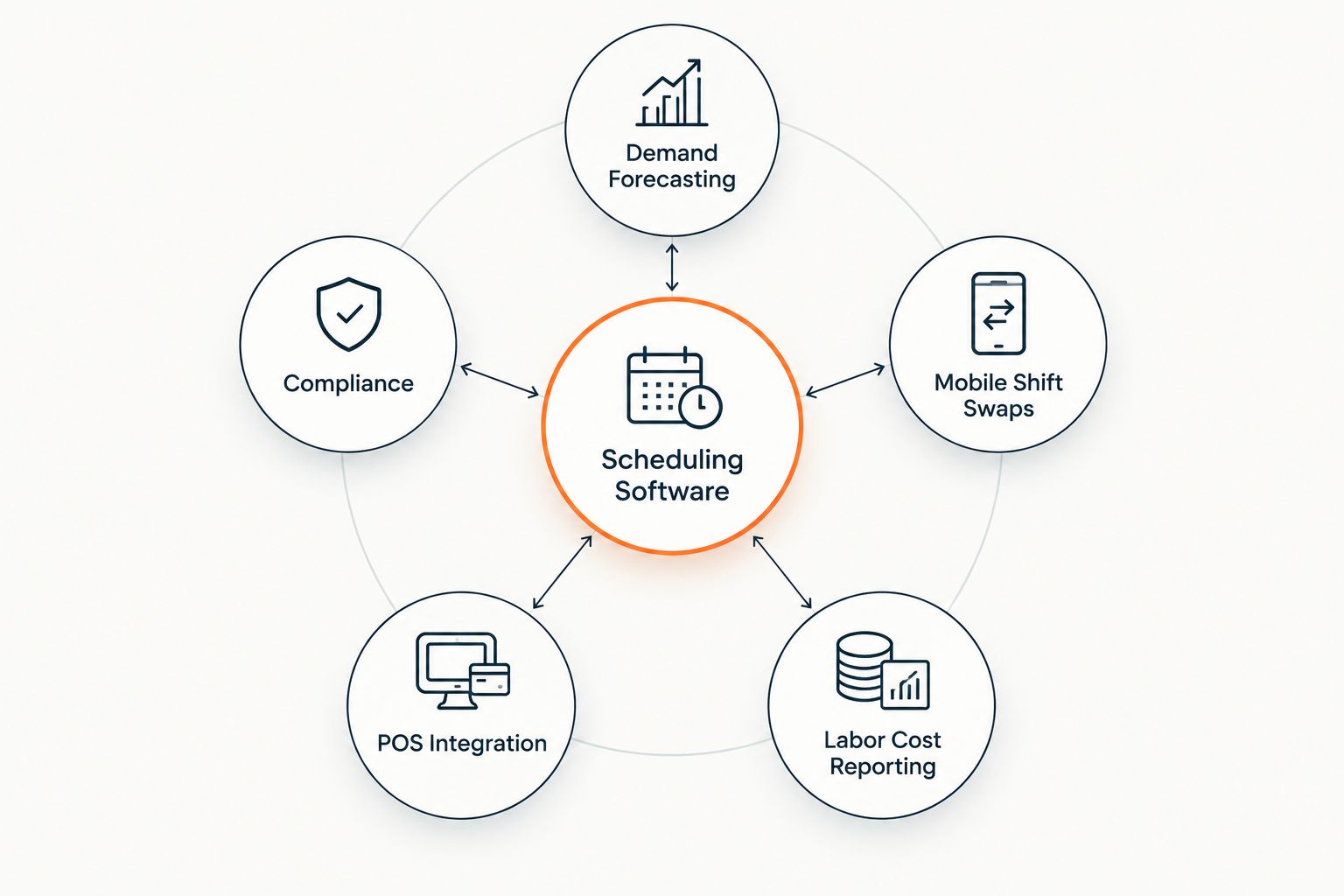
- Demand-based forecasting that reads order volume, not just historical foot traffic
- Built-in compliance with predictive scheduling and Fair Workweek rules in cities like Seattle, Chicago, and New York, and statewide in Oregon
- Mobile shift swaps and messaging so pickers and drivers can trade hours without a manager phone tree
- Direct integration with POS, order management, and payroll systems
- Multi-location visibility for chains running more than one store or a dark store
- Labor-cost-to-sales reporting broken out by department: produce, deli, pickup, delivery
“If your scheduling software can't see how many orders are stacked for a 6 p.m. delivery window, you're staffing off memory, not data.”
Workforce scheduling software for grocery fulfillment: at a glance
| Software | Best for | Standout feature | Key limitation |
|---|---|---|---|
| Deputy | Multi-location grocery chains needing compliance | Auto-scheduling with Fair Workweek and predictive scheduling rules built in | Compliance modules take setup time to configure per state |
| 7shifts | Deli counters and made-to-order kitchens | Labor cost tracked as a percentage of real-time sales | Built for restaurant-style shifts, not distribution-center scheduling |
| Legion Technologies | Regional chains with heavy order-volume swings | AI labor forecasting tied to expected transaction volume | Deployment favors larger operators, overbuilt for a single store |
| UKG Ready | Enterprise multi-state grocery chains | Scheduling bundled with payroll, HR, and time and attendance | Full-suite adoption is a bigger project than scheduling alone |
| When I Work | Single-location independent grocers | Simple shift swaps and team messaging in one app | Thin demand-forecasting for high-volume fulfillment |
| Homebase | Small independent grocery teams on a tight budget | Straightforward shift builder and time clock | Fewer grocery-specific forecasting tools than the platforms above |
1. Deputy: best workforce scheduling software for multi-location compliance
Deputy builds schedules and applies jurisdiction-specific predictive scheduling rules automatically, then pushes the published shift board to a mobile app for cashiers, pickers, and delivery staff. A regional chain with stores across two or three Fair Workweek jurisdictions can run one compliance ruleset instead of managing each store's requirements by hand.
Deputy pros:
- Auto-scheduling with compliance overlays built in
- Schedules across multiple store locations from one dashboard
- Time-and-attendance capture that flags overtime before it happens
- Open API for tying schedules to POS and payroll systems
Deputy cons:
- Compliance functionality is heaviest for multi-jurisdiction chains, less relevant to a single-location shop
- Forecasting still leans on historical sales data more than live online order volume
Best for: regional grocery chains scheduling across more than one Fair Workweek jurisdiction. Verdict: Buy.
2. 7shifts: best for deli counters and made-to-order kitchens
7shifts started in restaurants and now serves grocery deli counters, hot bars, and prepared-food kitchens with scheduling tied directly to sales data. It shows labor cost as a percentage of sales while the schedule is still being built, so a manager can add or cut a shift before that percentage drifts past target.
7shifts pros:
- Labor-cost-to-sales ratio visible in the scheduling view
- Tip pooling and a manager log book built for food-service teams
- Mobile app built around shift swaps and availability requests
7shifts cons:
- Designed around a single-location food-service shift pattern, not distribution-center or delivery-fleet scheduling
- Less useful for stores without a deli, hot bar, or prepared-foods counter
Best for: grocery stores with a deli counter, hot bar, or made-to-order kitchen. Verdict: Buy for prepared-foods operations.
3. Legion Technologies: best for AI demand forecasting at scale
Legion Technologies runs demand forecasting underneath its scheduling engine, projecting labor need from expected transaction and order volume instead of a flat day-of-week average. Regional chains use it to staff pickers and cashiers ahead of the swings that come with a weekly ad, a weather event, or a holiday spike.
Legion pros:
- Forecasting model reads transaction-level demand, not just historical averages
- Automated schedule generation cuts manual shift-building time
- Built for chains running many locations at once
Legion cons:
- Deployment and configuration favor larger operators
- The forecasting advantage is wasted on a single store with a stable, predictable shift pattern
Best for: regional chains with order-volume swings across many stores. Verdict: Buy for multi-store chains.
4. UKG Ready: best for enterprise chains bundling payroll and scheduling
UKG Ready folds scheduling into a full workforce suite that also covers payroll, HR, and time and attendance, aimed at chains running payroll across multiple states. Scheduling data flows straight into payroll processing, so overtime and shift differentials calculate without a manual export step.
UKG Ready pros:
- One system for scheduling, payroll, HR, and attendance
- Strong multi-state compliance handling
- Reporting spans labor cost across departments and locations
UKG Ready cons:
- Adopting the full suite is a bigger project than adopting scheduling alone
- Smaller independent grocers may end up paying for HR and payroll modules they don't need
Best for: enterprise grocery chains running payroll across multiple states. Verdict: Hold — evaluate the full-suite commitment before buying.
5. When I Work: best for single-location independent grocers
When I Work keeps scheduling to shift building, availability, and team messaging on one mobile app, aimed at single-location teams that don't need enterprise forecasting. A store manager builds the week's schedule, staff request swaps inside the app, and the whole team sees updates without a group text chain.
When I Work pros:
- Fast setup for a single store
- Shift swap requests handled inside the app
- Team messaging built in for shift-day updates
When I Work cons:
- Forecasting tools are thin next to Deputy or Legion
- Not built for multi-jurisdiction compliance rules
Best for: single-location independent grocers running a small hourly team. Verdict: Buy for single-store operators.
6. Homebase: best budget option for small independent grocery teams
Homebase covers the basics of shift scheduling and a mobile time clock for hourly teams, aimed at small independent grocery stores that need a shift board without a long setup process.
Homebase pros:
- Straightforward shift builder
- Mobile time clock for hourly staff
- Team messaging for last-minute shift coverage
Homebase cons:
- Fewer grocery-specific forecasting tools than the platforms above
- Multi-location features are thinner than Deputy or UKG Ready
Best for: small independent grocery teams on a tight budget. Verdict: Buy for single-location, budget-conscious teams.
How we ranked these
Each platform above is scored against the six criteria listed earlier: demand forecasting, compliance coverage, mobile shift swaps, POS and payroll integration, multi-location visibility, and labor-cost reporting by department. None of them score a perfect six — that's normal in workforce scheduling software, and a platform that claims to nail every category for every store size is overselling itself.
Scheduling only solves half the labor equation; the other half is what happens once a shift starts. Pair whichever tool you pick with order picking and packing software for grocery ecommerce so both systems point at the same order volume instead of two different guesses.
See order volume before you staff to it
Local Express order management shows order volume by hour across web, app, and kiosk channels.
Which workforce scheduling software should you choose?
For most independent and regional grocers running fulfillment in 2026, Deputy is the default pick — it covers compliance across store locations and integrates with payroll without forcing a full HR-suite commitment. If your store runs a deli counter or made-to-order kitchen, 7shifts wins on labor-to-sales visibility that Deputy doesn't match. Chains with real order-volume swings across a dozen-plus stores should look at Legion Technologies for the forecasting depth; a single independent store on a tight budget does fine with Homebase or When I Work.
None of these platforms replace the operational side of fulfillment once the schedule is live. Training staff to fulfill online grocery orders accurately is what keeps pick accuracy up during the shift the software just staffed — a perfect schedule with untrained pickers still produces wrong orders. Local Express doesn't run your staffing shifts directly, but its order management feeds the same order-volume data these workforce scheduling platforms need to forecast accurately, so the two systems should always be looking at the same numbers.
FAQ
What's the best workforce scheduling software for grocery fulfillment in 2026?
Deputy is the best overall pick in 2026 for grocery fulfillment because it applies compliance rules automatically across multiple store locations while integrating with POS and payroll. 7shifts is stronger specifically for deli counters and made-to-order kitchens.
Is Deputy better than 7shifts for a grocery store?
Deputy is better for multi-location compliance and general fulfillment scheduling; 7shifts is better if your store runs a deli, hot bar, or prepared-foods counter where labor tracks against food sales in real time. Pick based on which operation you're staffing, not brand reputation.
Does workforce scheduling software integrate with a grocery POS system?
Most of the platforms above, including Deputy, 7shifts, and UKG Ready, offer integrations or open APIs that connect scheduling to POS and payroll systems. Confirm the specific POS integration list with the vendor before buying, since coverage varies by platform.
Do grocery stores need separate software for delivery driver scheduling?
Not necessarily — platforms like Deputy and Legion Technologies schedule pickers, cashiers, and delivery staff in one system. Some chains still run a dedicated delivery management tool alongside general scheduling software when driver routing needs are complex.
What's the difference between workforce scheduling software and an order management system?
Workforce scheduling software builds and manages employee shifts; an order management system tracks orders across web, app, and kiosk channels. The two should share order-volume data so staffing decisions reflect actual demand instead of a manager's guess.
Can scheduling software forecast labor needs based on online order volume?
Legion Technologies is built specifically around this kind of demand-based forecasting, projecting labor need from expected transaction volume rather than historical averages alone. Deputy and 7shifts lean more heavily on historical sales patterns.
Are there compliance requirements for grocery employee scheduling?
Yes — predictive scheduling and Fair Workweek laws apply in cities including Seattle, Chicago, and New York, and statewide in Oregon, requiring advance notice of schedules and predictability pay for last-minute changes. Confirm which rules apply to your specific store locations.
Is workforce scheduling software worth it for a single independent grocery store?
Yes, even a single-location store benefits from mobile shift swaps and a time clock that replaces a paper schedule or group text chain. When I Work and Homebase are built specifically for that single-store use case without enterprise complexity.
One last thing
Most grocery managers still build next week's schedule off last week's foot traffic. But online order volume is knowable days in advance — pickup times and delivery windows are booked before the week even starts. Feed that booked-slot data into whichever scheduling platform you pick and you're staffing to a number you already know, not a guess, which is the real gap between 2026's scheduling tools and the punch-card systems most grocers replaced them from.