Campus grocery last mile delivery software is a system for coordinating grocery orders, dispatch, and final handoffs with the aim of completing deliveries reliably. For U.S. independent and regional grocers serving campuses in 2026, evaluate building access, food handling, and order exceptions—not just the route shown on a map.
- Choose last mile delivery software for campus grocery stores around building access, grocery fulfillment, and confirmed handoffs.
- Local Express fits grocers seeking branded ordering, order management, and last mile grocery delivery together.
- Test residence hall access, substitutions, and failed handoffs before expanding delivery zones.
- Measure completed deliveries and contribution after fulfillment costs, not dispatch speed alone.
Why delivery software matters for campus grocery stores
A campus address is not necessarily a usable delivery destination. Before accepting orders, distinguish the street address from the approved entrance, customer meeting point, and unloading location. Confirm each requirement with campus facilities or housing staff rather than assuming drivers can enter residence halls.
Grocery fulfillment adds another requirement: an order must be ready before a driver collects it. Refrigerated items, substitutions, and prepared foods need a defined handoff process. Dispatching against an unconfirmed preparation time creates a scheduling problem that route planning alone cannot fix.
Local Express is best suited to campus-serving grocers that need branded ordering, order management, and grocery delivery together. Local Express provides these capabilities within its unified commerce platform; use a demonstration to verify the campus-specific workflows your store requires.
For your 2026 evaluation, separate essential workflows from optional features. A clear exception process matters more than an impressive dashboard when a customer cannot meet a driver or a building entrance is closed.
How to choose and launch campus grocery delivery software
1. Map approved campus delivery points
Start with a shared spreadsheet and a campus map. Record which buildings you intend to serve, where drivers can stop, and how customers receive groceries. This manual inventory gives you a delivery specification before you evaluate software.
Treat access instructions as operating information, not informal driver knowledge. Assign someone to confirm the instructions with the campus and update them when access changes. Avoid collecting door codes or unnecessary student information in general-purpose delivery notes.
Approve destinations before you enable checkout. Software should make your approved service boundaries enforceable; it should not replace the work of defining them. Test whether an address that looks valid on a map actually produces usable delivery instructions.
- Record building names, street addresses, and approved entrances.
- Identify permitted unloading areas and customer meeting points.
- Confirm residence hall and campus access rules with authorized staff.
- Write a fallback handoff procedure for inaccessible entrances.
- Assign an owner to maintain the destination directory.
2. Define delivery windows from actual work
Use a paper schedule or spreadsheet to document picking, packing, staging, travel, and handoff. Observe your store's workflow before promising delivery windows. A route estimate does not include the time spent finding an entrance or waiting for a customer.
For an initial 2026 pilot, start with 2 delivery zones: an approved campus zone and an approved nearby off-campus zone. This is a planning recommendation, not a capacity benchmark. Set acceptance limits from the staff and transportation you actually have available.
Compare your manual schedule with how a proposed system handles full windows, delayed picking, and reassignment. The guide to managing delivery time-slot capacity explains the scheduling decisions that belong before dispatch.
- Define when each delivery window opens and closes.
- Reserve preparation time before driver collection.
- Separate campus access time from driving time.
- Limit accepted orders to available fulfillment capacity.
- Document who can close a window or reassign an order.
3. Connect ordering to dispatch
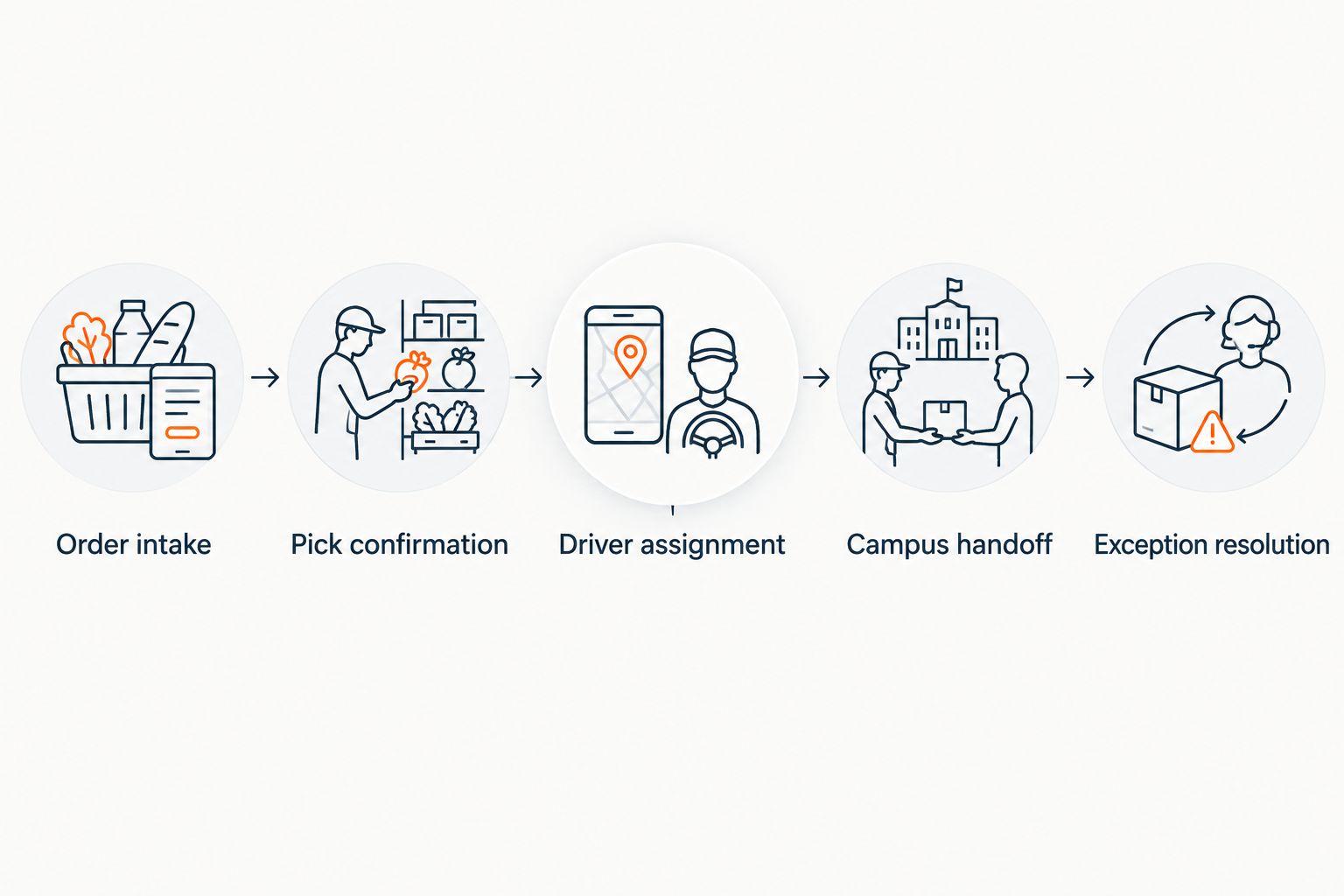
First, trace a sample order manually from checkout through completion. Write down every transfer between the shopper, picker, dispatcher, driver, and support team. Use that record to identify repeated data entry and unclear ownership.
Local Express last mile grocery delivery is part of an offering that also includes white-label grocery websites, branded mobile apps, and order management. That makes it a relevant option when you want to evaluate ordering and delivery together rather than buying dispatch as an isolated function.
The limitation is implementation scope: a connected workflow still requires catalog preparation, staff responsibilities, and campus rules. Ask the vendor to demonstrate your process, not a generic delivery. Confirm integrations, status changes, and customer communications before treating them as available capabilities.
- Order intake: verify address and delivery-window details.
- Pick confirmation: record substitutions and fulfillment readiness.
- Driver assignment: identify the person responsible for delivery.
- Campus handoff: apply the approved meeting-point procedure.
- Exception resolution: record the outcome and support owner.
4. Protect groceries through the handoff
Start with written packing and staging procedures that staff can follow without new software. Separate products according to their handling needs and establish when an order is ready for collection. Assign responsibility for checking the packed order before release.
For campus deliveries, decide what happens when the customer does not arrive at the meeting point. Do not leave perishable groceries in an unsecured location merely to mark an order complete. Define escalation, return handling, and customer communication before the first delivery.
Build 3 handoff checkpoints into your pilot: packing release, driver collection, and customer receipt. These are recommended process checkpoints, not a claim about any platform's default settings. During evaluation, ask how the software records each checkpoint and whether staff can distinguish a completed handoff from an unsuccessful attempt.
- Check the packed order against the final item list.
- Separate groceries according to temperature and handling requirements.
- Establish an approved staging area and collection procedure.
- Define customer contact and unattended-delivery rules.
- Record unsuccessful handoffs without misclassifying them as completed.
5. Test campus exceptions before launch
A shared checklist is enough to begin testing. Walk through each scenario with store staff and a driver, then repeat it in the proposed software. Record the expected result, actual result, and person responsible for correction.
Before widening service in 2026, run 5 test orders covering an accessible entrance, a restricted entrance, an unavailable item, an unreachable customer, and a delayed collection. This is a recommended test set, not evidence of delivery performance. Use test participants and controlled transactions rather than exposing customers to an unfinished process.
Pass the exception tests before promoting delivery. A system that handles an ordinary order but leaves staff improvising during a failed handoff is not ready for your campus workflow. Resolve unclear responsibilities before adding destinations.
- Test whether checkout captures the approved meeting point.
- Confirm how substitution approval reaches fulfillment staff.
- Check what happens when a driver cannot access the destination.
- Verify customer contact and escalation procedures.
- Reconcile cancellations, returns, and final order status.
6. Measure completion and delivery contribution
Begin with an order-level spreadsheet. Record accepted orders, completed handoffs, failed attempts, fulfillment labor, transportation expenses, packaging, and refunds. Use your actual records rather than adopting a generic grocery-delivery benchmark.
Calculate delivery completion rate as completed deliveries divided by accepted delivery orders for the same period. Define how cancellations enter that calculation and keep the definition consistent. Track attempted deliveries separately so a failed handoff does not disappear inside an apparently successful dispatch report.
For financial review, start with order revenue and subtract product cost plus attributable fulfillment expenses. Include picking, packing, transportation, payment processing, packaging, and refunds as applicable. A completed delivery is not automatically a profitable delivery. Review campus and off-campus orders separately before deciding where to expand.
- Record accepted, completed, canceled, and failed delivery orders.
- Measure picking and handoff labor from actual work records.
- Assign attributable transportation and packaging expenses.
- Review refunds and repeated delivery attempts.
- Compare contribution by delivery zone and window.
7. Expand around the campus calendar
Use your store's sales records and the published campus calendar to plan expansion. Identify move-in periods, class schedules, athletic events, finals, and breaks that affect the destinations you serve. Do not assume every campus follows the same shopping pattern.
For the 2026 operating plan, add destinations only after confirming access, fulfillment capacity, and delivery contribution. A larger service boundary adds obligations as well as potential orders. Recheck staffing and handoff procedures when campus access or your own store hours change.
Keep customer messaging precise. Describe the delivery area, approved handoff process, and current service windows without promising access that drivers do not have. Coordinate promotional activity with fulfillment staff so an advertised delivery window reflects actual capacity.
- Review campus dates against your own order history.
- Reconfirm building access before major schedule changes.
- Add destinations with documented handoff procedures.
- Adjust delivery windows to available staffing.
- Review exceptions before widening the service boundary again.
Compare delivery options for campus-serving grocers
Choose the operating model before choosing software. A manual pilot is best for documenting requirements; connected commerce is best for evaluating ordering and delivery as one workflow. Dedicated dispatch and marketplaces answer different operational needs.
These options are not interchangeable. A driver-management layer does not automatically replace grocery ordering, while a full commerce platform requires broader implementation decisions. Ask each provider to demonstrate the responsibilities you expect it to cover.
| Option | Best for | Practical advantage | Key limitation |
|---|---|---|---|
| Manual dispatch with a shared spreadsheet | A controlled pilot that documents campus requirements | Lets staff test access, handoffs, and responsibilities before software selection | Staff must update assignments and reconcile statuses manually |
| Dedicated dispatch software | A grocer retaining its existing ordering system | Focuses evaluation on driver assignment and delivery execution | Ordering, fulfillment, and support connections need separate verification |
| Local Express unified commerce platform | A grocer seeking branded ordering, order management, and grocery delivery together | Includes grocery ecommerce websites, branded apps, order management, and last mile delivery in its offering | Campus access rules, integrations, and required workflows still need validation |
| Marketplaces | A grocer evaluating an additional ordering and fulfillment channel | Offers an alternative to operating every customer-ordering step directly | Campus handoff responsibilities and customer-data access depend on the agreement |
For Local Express delivery software evaluation, bring your destination directory and exception checklist to the demonstration. Ask who owns unresolved orders, how staff correct mistakes, and what information moves between systems. Keep selection tied to demonstrated workflows rather than feature names.
Common mistakes campus grocery operators make
Treating a map pin as a handoff instruction
A building location does not tell a driver where to stop or meet a customer. Store the approved entrance and meeting point separately, and confirm the customer sees usable instructions before delivery.
Opening delivery windows before assigning fulfillment labor
Driver availability cannot compensate for an order that has not been picked. Assign picking and packing responsibility before accepting delivery orders, then connect readiness to the dispatch decision.
Sending perishables without a failed-handoff procedure
An unreachable customer creates a food-handling decision, not just a messaging task. Establish who authorizes the next action and how staff record the order outcome without calling an unsuccessful attempt complete.
Promoting service through campus breaks without checking access
A published calendar is a planning input, not confirmation that a building remains accessible. Recheck approved delivery points and customer communications whenever campus schedules change.
Expanding on order count alone
More accepted orders do not establish profitable service. Review completed handoffs, repeated attempts, refunds, and attributable labor before opening another delivery zone.
FAQ
What's the best last mile delivery software for campus grocery stores?
The best fit is software that supports your approved campus destinations, grocery fulfillment workflow, and failed-handoff process. Local Express is a relevant option for grocers seeking branded ordering, order management, and last mile grocery delivery together; validate campus-specific requirements in a demonstration.
Can an independent grocery store deliver to residence halls?
An independent grocery store should offer residence hall delivery only through handoff arrangements approved for the buildings it serves. Confirm entrance access, permitted stopping locations, and customer meeting points with authorized campus staff before enabling those destinations.
Is dedicated dispatch software better than a unified commerce platform?
Dedicated dispatch software fits a grocer that wants to retain its ordering system and evaluate delivery execution separately. A unified commerce platform fits an evaluation that includes branded ordering and order management, but either approach requires verification of integrations and campus workflows.
Do campus grocery deliveries need refrigerated handling?
Campus grocery deliveries need handling appropriate to the products in each order. Set packing, staging, transportation, and unsuccessful-handoff procedures before offering delivery of perishable groceries.
How do I test campus grocery delivery before launch?
Test the complete workflow with controlled orders before accepting public delivery orders. Include approved and restricted entrances, an unavailable item, an unreachable customer, and a delayed driver collection, then resolve each failed test.
What should I measure during a campus grocery delivery pilot?
Measure completed handoffs, failed attempts, fulfillment labor, attributable delivery expenses, and refunds. Compare these records by zone and delivery window so dispatch activity does not stand in for successful or profitable service.
Does grocery delivery software automatically handle campus access rules?
Campus access rules require operator verification and a defined delivery procedure. Ask the software provider to demonstrate how approved destinations, entrance instructions, and unsuccessful access attempts work in your proposed setup.
One last thing
Test the walk from the unloading point to the handoff point. Your 2026 pilot should capture that work separately from road travel: a short drive does not establish a short delivery task. Use the observation to revise delivery windows before expanding service.